

@zennopay/react-native is a native bridge: a thin JS API over the native
Zennopay iOS and Android PaymentSheets. The
camera scanner, slide-to-pay physics, and confirm/status UI all render
natively — nothing is re-implemented in JS. One await presentSheet(...), one
PaymentResult.
It supports both the legacy bridge and the new architecture
(Fabric/TurboModules) — the module is interop-compatible.
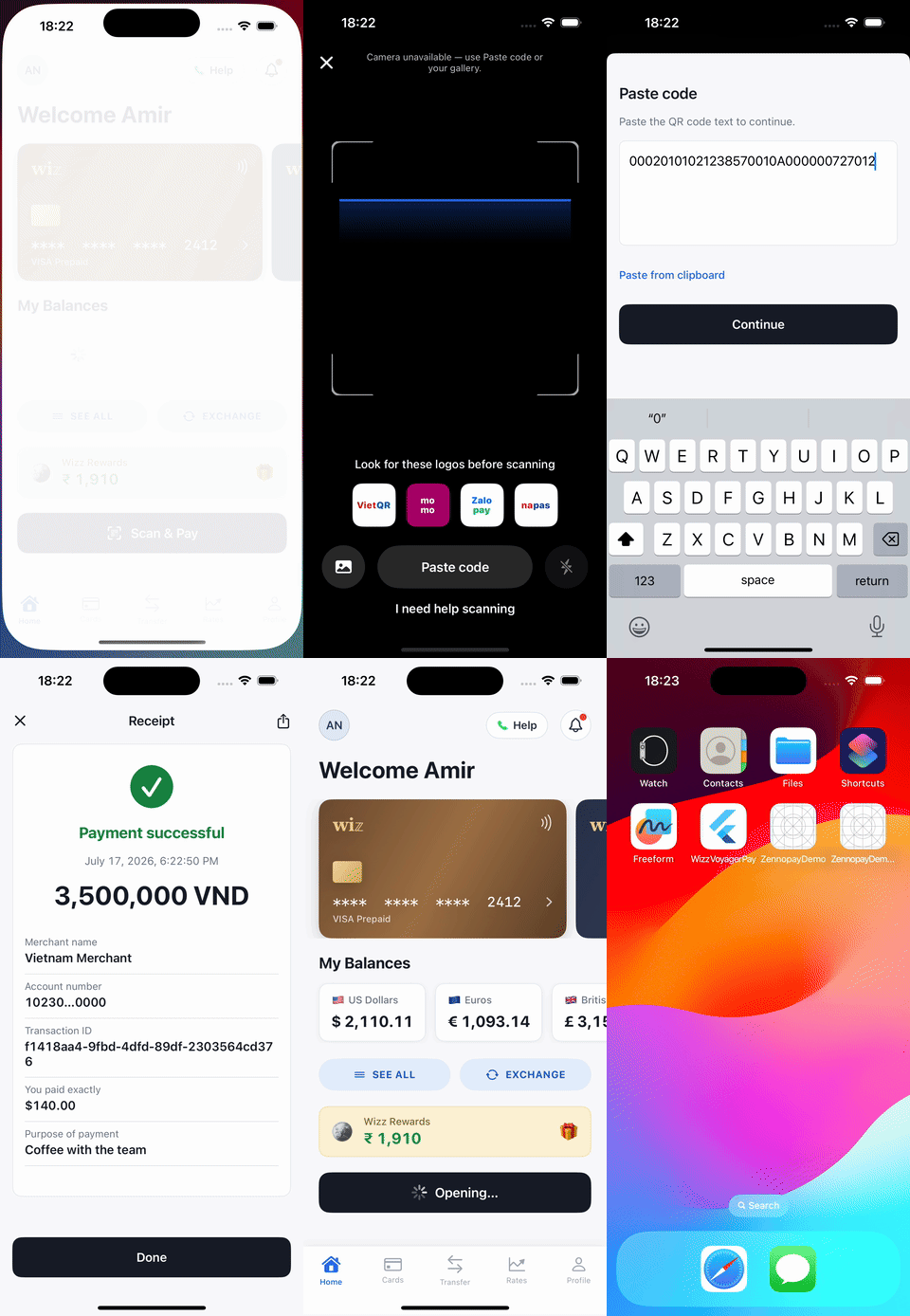
The PaymentSheet, end to end, presented from the sample wallet app.
Requirements
- React Native 0.70+, React 17+
- The native Zennopay SDKs must be linked (see below) — this package is the JS surface, not the implementation
- A backend session endpoint that creates the intent and returns the Zennopay-minted session token
Install
Link the native SDKs
iOS — the podspec declares a dependency on the nativeZennopay pod, so
installing pods pulls it in:
ios/YourApp/Info.plist:
in.zennopay:sdk, on Maven Central). Declare mavenCentral() alongside
google() in android/settings.gradle. The CAMERA permission is merged from the native SDK’s
manifest; the SDK requests it at runtime.
Rebuild the app after installing (npx react-native run-ios /
run-android) — a Metro-only reload will not pick up the native module.
Configure
session_token value goes into the SDK’s sessionJwt argument.
Pass it unchanged; Zennopay mints the token for you.
Present the PaymentSheet
Wrap your app inZennopayProvider (sets the default environment), then call
presentSheet from the useZennopay() hook:
Handle the result
The promise rejects only for integration errors — no presentation
context (
no_presentation_context) or the native SDK not linked
(native_sdk_unavailable). A payment failure resolves normally with
{ status: 'failed', error }, where error.code is a stable string from
the shared taxonomy (invalid_jwt, intent_mismatch, jwt_expired,
quote_expired, limit_exceeded, network_error, timed_out, …).pending means the user left during processing or status polling timed out — the payment may still settle;
reconcile via your webhook or transaction history.
Customize appearance
Theming is a plain JS object, serialized to the nativeZennopayAppearance:
appearance for the default Zennopay look with system light/dark.
Structural rules (radius cap, tabular figures, accent-as-state) are enforced
natively and can’t be overridden.
How the bridge works
presentSheetcalls the native module’spresent(...), which wrapsZennopay.presentCheckouton each platform and resolves exactly once with the terminal result.refreshSessionis serviced over an event + reply: the native side emitsZennopaySessionExpired { intentId }, the bridge runs your async callback, and replies with the fresh token — the bridge never blocks.- The session token crosses the bridge once, into native memory; it is never placed in a URL. Confirm idempotency, retries, and relaunch recovery are owned by the native SDKs.
Test
- Simulator/emulator: no usable camera — the native sheet falls back to paste-QR; paste any VietQR payload string.
- Sandbox end-to-end:
{ environment: 'sandbox' }+ a session from your sandbox backend drives the flow to a realcapturedon the sandbox delivery rail. - Link check: if
presentSheetrejects withnative_sdk_unavailable, re-runpod install/ a full Gradle build — the JS package is installed but the native SDK isn’t.
Next steps
Build your session endpoint
The one backend route the sheet needs.
Test your integration
The sandbox loops to run before release.
Webhooks
Reconcile terminal states server-side.
QR Payments limits
The corridor limits Zennopay enforces for you.