

zennopay_flutter presents the native iOS or Android
PaymentSheet through a Flutter bridge. Await
Zennopay.presentSheet(...) to receive a PaymentResult. The sheet renders the full pay
experience — QR scan → amount + FX quote → slide-to-pay → result — and your
app never leaves the foreground.
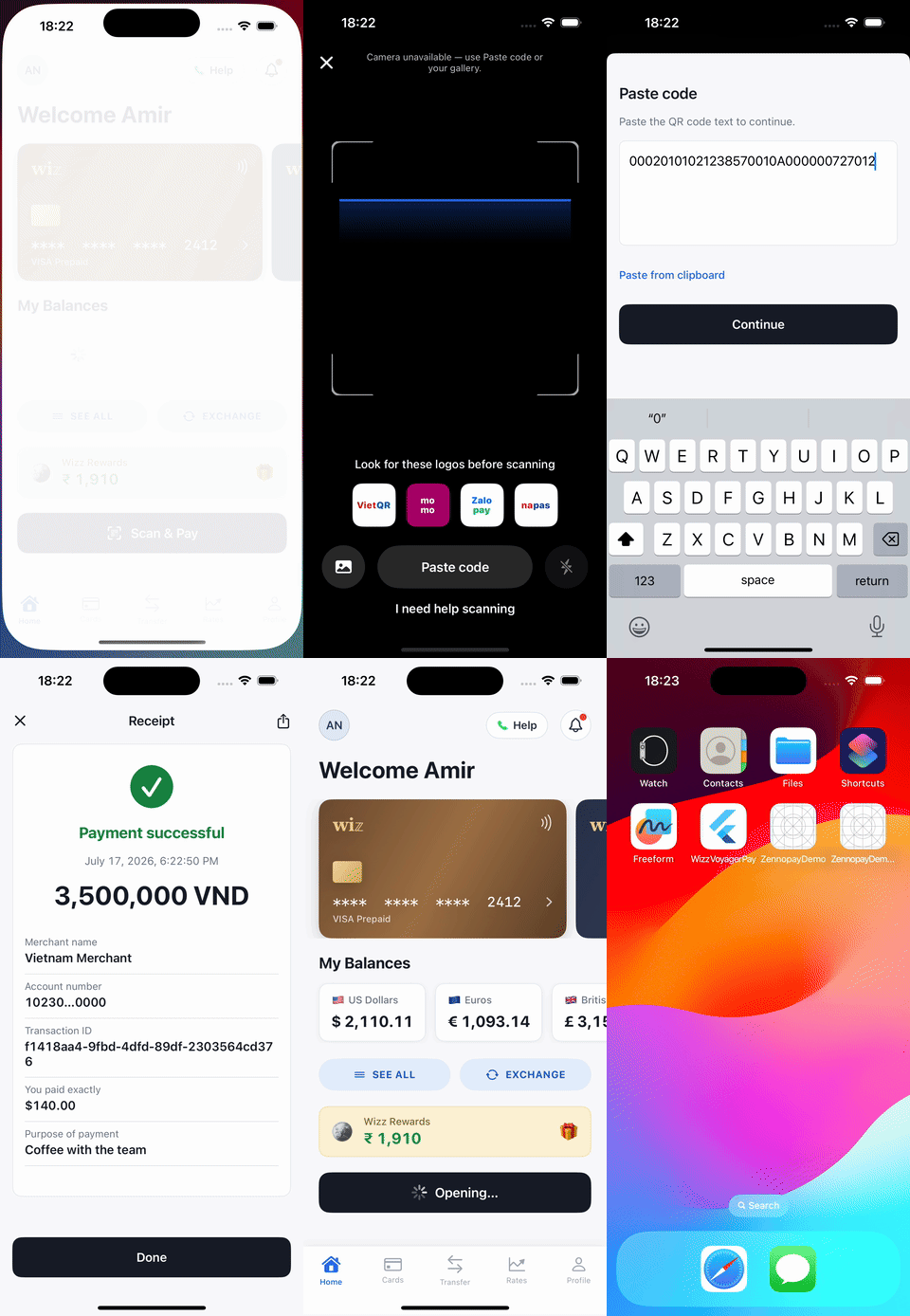
The PaymentSheet, end to end, presented from the sample wallet app.
Requirements
- Flutter 3.19+ / Dart 3.4+
- iOS 16+ and Android API 24+ targets; camera and payment UI are provided by the native Zennopay SDKs
- A backend session endpoint that creates the intent and returns the Zennopay-minted session token
Install
Platform setup
The scanner uses the camera; add the platform declarations: iOS —ios/Runner/Info.plist:
CAMERA permission; nothing
to add. On denial (or no camera), the sheet falls back to a paste-QR field on
both platforms.
Configure
The environment is a config value, not a code path:session_token value goes into the SDK’s sessionJwt argument.
Pass it unchanged; Zennopay mints the token for you.
Present the PaymentSheet
With a checkout session from your backend in hand, your app awaits one call:presentSheet takes neither a
BuildContext nor a navigator key. Rebuild the native app after installing
the plugin; a Flutter hot reload does not link native dependencies.
Handle the result
Flutter promotespending to a first-class case, and Completed/Pending
carry an optional Receipt:
Pendingmeans the user left during processing or polling timed out — the payment may still settle. Show a soft state and reconcile via your webhook or transaction history.Failedcarries a typedZennopayErrorwith a stableZennopayErrorCode(invalidJwt,intentMismatch,jwtExpired,quoteExpired,limitExceeded,networkError, …).
Customize appearance
ZennopayAppearance themes the sheet — colors (with per-mode dark variants),
corner radii, typography, primary button, and an optional header logo:
const ZennopayAppearance.automatic()) for the default Zennopay
look with system light/dark. Structural rules are not overridable — radii are
clamped to ≤ 12, amounts render in tabular figures, and the accent is reserved
for state.
Test
- Simulator/emulator: no usable camera — use the sheet’s paste-QR fallback with any VietQR payload string; the backend does the authoritative parse.
- Sandbox end-to-end:
ZennopayConfig.sandbox+ a session from your sandbox backend drives the flow to a realcapturedon the sandbox delivery rail. - Fail-fast checks: a blank or mismatched session token resolves immediately
with
Failed(invalidJwt/intentMismatch) before any UI is shown.
Next steps
Build your session endpoint
The one backend route the sheet needs.
Test your integration
The sandbox loops to run before release.
Webhooks
Reconcile terminal states server-side.
QR Payments limits
The corridor limits Zennopay enforces for you.