

PaymentResult to your callback. The UI is Jetpack Compose; scanning is
CameraX + ML Kit, on-device.
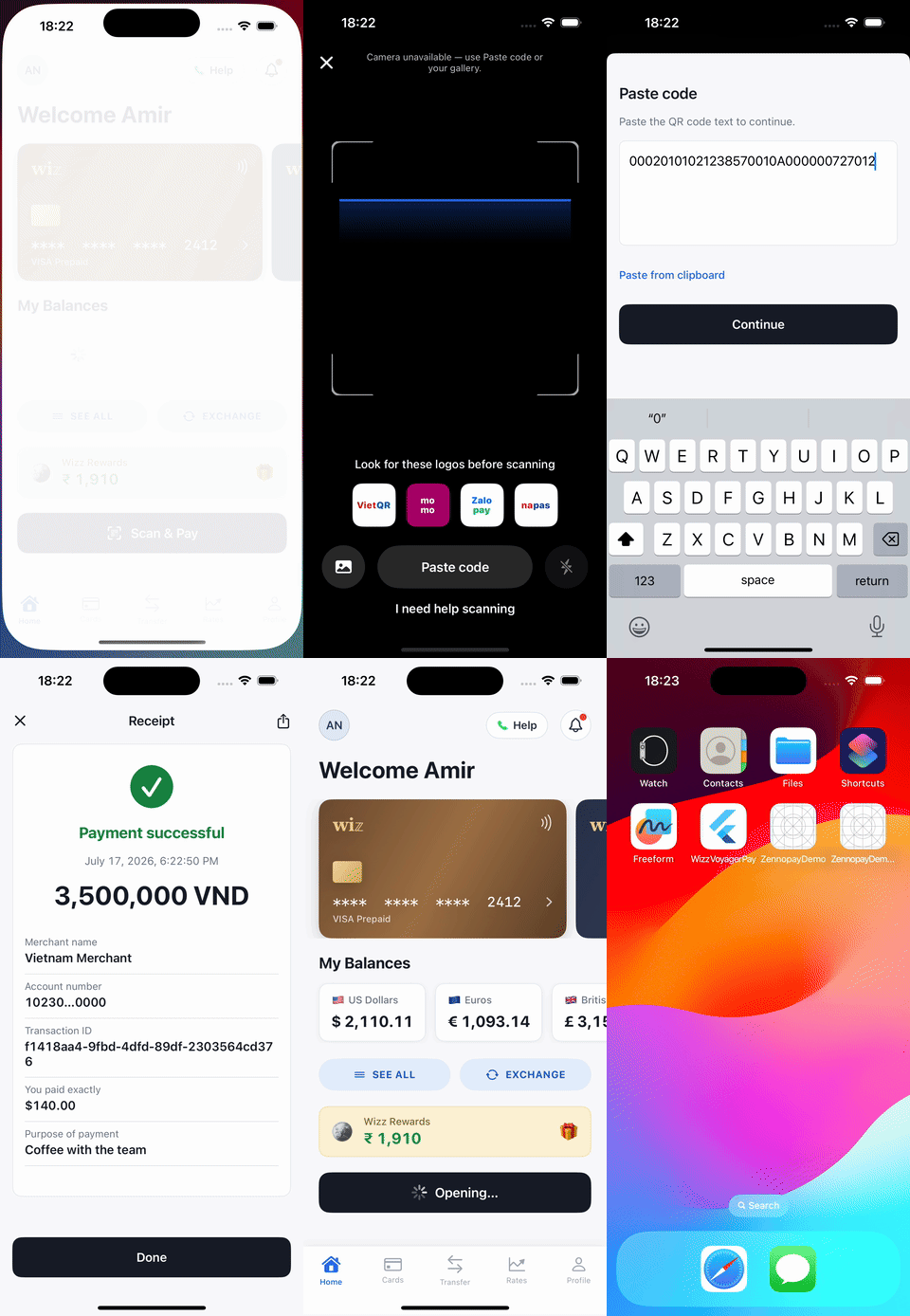
The PaymentSheet, end to end, presented from the sample wallet app.
Requirements
minSdk24 (Android 7.0),compileSdk34- Kotlin 1.9+, AndroidX
- Your app does not need to use Compose — the sheet runs in its own Activity. A Compose-first entry point is provided for hosts that are.
- A backend session endpoint that creates the intent and returns the Zennopay-minted session token
Install
mavenCentral() in your settings.gradle.kts (the
Android default) resolves it. The Gradle coordinate is in.zennopay:sdk; the
Kotlin import namespace stays com.zennopay.sdk.
Camera permission
The SDK’s manifest already merges in<uses-permission android:name="android.permission.CAMERA" />
(with the camera marked as an optional feature), and the SDK requests the
runtime permission itself when the scanner opens. You add nothing to your
manifest — just declare camera use in your Play Store listing.
If the user denies the permission, the sheet degrades to a paste-QR-data
fallback — the flow is always completable without a camera.
Configure
The environment is a value, not a code path:Zennopay.configure(config) — per-call config still overrides it.
See Environments for canonical and supported
alternate hosts.
The API’s session_token value goes into the SDK’s sessionJwt argument.
Pass it unchanged; Zennopay mints the token for you.
Present the PaymentSheet
With a checkout session from your backend in hand, your app makes one call. Two integration patterns:Pattern 1 — Compose launcher (recommended)
For Compose hosts,rememberZennopayLauncher binds your result callback and
config once and hands you a stable present lambda — safe to pass straight to
click handlers, stable across recompositions:
Pattern 2 — one-shot presentCheckout
From any ComponentActivity (Views or Compose), call the entry point directly:
Intent, so it can’t leak via logcat or recents.
Handle the result
ZennopayError is a sealed taxonomy with stable code strings
(InvalidJwt, IntentMismatch, JwtExpired, MalformedToken,
InvalidIssuer, quote/confirm/network cases, …) — exhaustive in a when.
PaymentResult.Pending means the user left during processing or polling
timed out. The payment may still settle;
reconcile via your webhook or
GET /v1/payment_intents/:id rather than assuming a terminal failure.
Customize appearance
ZennopayAppearance themes the sheet to your brand — colors, corner radii,
typography, primary button, and an optional header logo:
ZennopayAppearance.Automatic) and the sheet uses the default
Zennopay look, following system light/dark.
Structural rules are not overridable: corner radii are clamped to ≤ 12 dp,
amounts always render in tabular figures, and the accent color is reserved
for state signals.
Test
- Emulator: the emulator’s virtual camera won’t decode a real QR reliably — use the sheet’s paste-QR fallback (or the emulator’s virtual-scene camera image) with any VietQR payload string. The backend does the authoritative parse either way.
- Sandbox end-to-end: run
ZennopayConfig.SANDBOXwith a session from your sandbox backend; delivery runs on the sandbox rail and the intent reachescaptured. - Fail-fast checks: pass a blank or mismatched session token and assert an
immediate
Failed(InvalidJwt)/Failed(IntentMismatch)with no UI. - Physical device: camera scanning and the runtime-permission prompt are the pre-release checklist.
Under the hood (what you can rely on)
- The session token is held in memory and sent as
Authorization: Beareron every REST call — never placed in a URL or anIntentextra. - Slide-to-pay fires
POST /confirmexactly once; the idempotency key is persisted (DataStore) before the network call, so retries and process death can never double-debit. - On relaunch mid-payment, the SDK recovers the true terminal status with a
GETrather than re-confirming.
ProGuard / R8
The SDK ships consumer rules; no additional configuration is needed.Next steps
Build your session endpoint
The one backend route the sheet needs.
Test your integration
The sandbox loops to run before release.
Webhooks
Reconcile terminal states server-side.
QR Payments limits
The corridor limits Zennopay enforces for you.