> ## Documentation Index
> Fetch the complete documentation index at: https://docs.zennopay.com/llms.txt
> Use this file to discover all available pages before exploring further.
# Reopen a receipt
> You keep your transaction list; the SDK reopens the authoritative Zennopay receipt — live status, our brand — with one call.
Your app already keeps its own transaction history: you consume
[`GET /v1/transactions`](/api-reference/overview) (or your own ledger) and
render the list your way. What you don't have to build is the **receipt** — the
authoritative, branded detail view for a single past payment, with its *live*
status (still pending, captured, failed, or refunded).
When a user taps a history row, fetch a short-lived **receipt token** from
Zennopay (one HMAC-signed call) and hand it to the SDK's `presentReceipt`. The
SDK fetches the authoritative receipt from Zennopay, renders it natively, and —
if the payment is still settling — polls it to a terminal state in place.
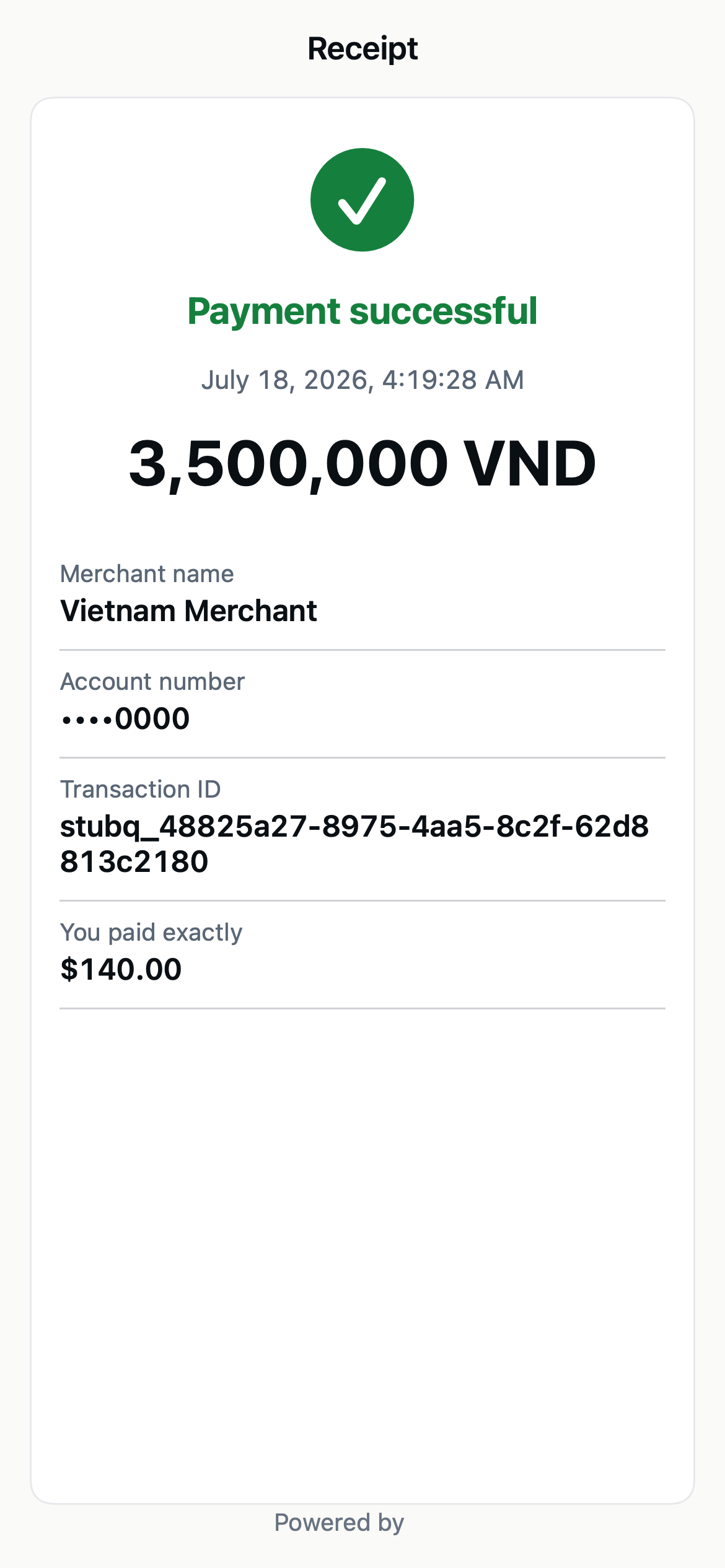 **You own the list, we own the receipt.** Your history list is yours — cached,
paginated, styled to your app. The receipt surface is the SDK's: one call
reopens the same branded receipt your user saw at pay time, but refreshed to
the payment's current state. No receipt UI, no status mapping, no refund copy
to build.
## The flow
```mermaid theme={null}
sequenceDiagram
autonumber
participant U as User
participant App as Your app
**You own the list, we own the receipt.** Your history list is yours — cached,
paginated, styled to your app. The receipt surface is the SDK's: one call
reopens the same branded receipt your user saw at pay time, but refreshed to
the payment's current state. No receipt UI, no status mapping, no refund copy
to build.
## The flow
```mermaid theme={null}
sequenceDiagram
autonumber
participant U as User
participant App as Your app
(+ Zennopay SDK)
participant BE as Your backend
participant ZP as Zennopay API
U->>App: Tap a row (an intent id) in your history list
App->>BE: POST /receipt-token { intent_id }
BE->>ZP: POST /v1/payment_intents/:id/receipt_token (HMAC, no body)
ZP-->>BE: { receipt_token, receipt_token_expires_at }
BE-->>App: { receipt_token, expires_at }
App->>App: Zennopay.presentReceipt(intentId, receiptToken)
App->>ZP: GET /v1/payment_intents/:id/receipt (Bearer receiptToken)
ZP-->>App: authoritative receipt + LIVE status
Note over App,ZP: If status is pending, the SDK polls the same
endpoint to a terminal state (reusing the token).
App-->>U: Receipt (captured / failed / refunded)
```
The receipt token is fetched **on demand**, only when the user opens a specific
receipt — not ahead of time for the whole list.
## The receipt token
A receipt token is a **distinct credential** from the
[session token](/payments/session-endpoint) you use to *make* a payment. Like
the session token, **Zennopay mints it** — you request one with a single
HMAC-signed call to `POST /v1/payment_intents/{intent_id}/receipt_token` (no
body). Its scope, power, and lifetime are different: a session token authorizes
one debit on one intent; a receipt token only *reads* a receipt.
| Property | Value |
| --------- | ------------------------------------------------------------------------------------------------------ |
| Minted by | Zennopay, on `POST /v1/payment_intents/{intent_id}/receipt_token` (HMAC-signed, no body) |
| Scoped to | The stored intent's `partner_user_id` (Zennopay derives it — you don't send it) — **not** intent-bound |
| Lifetime | `receipt_token_expires_at` — TTL 300s |
**How a receipt token differs from a session token:**
* **Minted per intent, scoped to a user.** You mint it by naming an intent you
own; Zennopay derives the user (`sub`) from that stored intent, so the token
can open any of *that user's* receipts within its window — but never another
user's.
* **Read-only.** It authorizes `GET /receipt` and nothing else — it can never
confirm, cancel, or move money.
* **Reusable.** The SDK reuses the one token to poll a pending receipt to its
terminal state, so you don't re-mint on every poll.
* **No attestations.** KYC/sanctions are a pay-time contract; reopening a
receipt doesn't move money, so they aren't required.
## Fetch the receipt token
Add one route to your [session endpoint](/payments/session-endpoint) backend. It
makes one HMAC-signed call to Zennopay — **no body** — for the intent id of the
tapped row, then returns the token. Reuse the same `hmacHeaders` helper from
your session endpoint; no dependencies beyond `node:crypto`.
```ts theme={null}
// POST /receipt-token — called when the user taps a history row, with that
// row's intent id. Confirm the user owns that intent before minting.
app.post("/receipt-token", async (req, res) => {
const user = await requireAuthedUser(req); // your app auth
const { intent_id } = req.body;
assertUserOwnsIntent(user, intent_id); // your own record of the intent
const path = `/v1/payment_intents/${intent_id}/receipt_token`;
const resp = await fetch(`${ZENNOPAY_BASE}${path}`, {
method: "POST",
headers: hmacHeaders("POST", path, ""), // same helper; empty body
});
if (resp.status !== 200) {
// 404 here means the intent isn't yours (or doesn't exist) — same response.
return res.status(502).json({ error: "receipt_token_failed" });
}
// Zennopay minted the receipt token — pass it straight through.
const { receipt_token, receipt_token_expires_at } = await resp.json();
res.json({ receipt_token, expires_at: receipt_token_expires_at });
});
```
The reference [`zennopay-partner-starter`](/payments/session-endpoint#receipt-tokens)
(v0.2.0+) ships this route as `POST /receipt-token { intent_id } → { receipt_token,
expires_at }`. Use it as the reference.
## Fetch is the SDK's job
The SDK calls `GET /v1/payment_intents/:id/receipt` with the receipt token as
`Authorization: Bearer`. You usually **don't** call this endpoint yourself —
`presentReceipt` does. It returns the authoritative receipt with a **live**
`status` (`pending`, `captured`, `failed`, or `refunded`) and the branded
receipt fields.
**Cross-user isolation.** The endpoint returns `404` for an intent that
doesn't belong to the token's `sub` — another partner's intent, or another of
your users' intents. It does not distinguish "doesn't exist" from "not yours",
so it leaks no information about intents outside the current user.
See [`GET /payment_intents/:id/receipt`](/api-reference/payment-intents/receipt)
for the full response shape.
## Present the receipt
Each platform exposes one `presentReceipt` call. Pass the `intentId` from your
history row and the freshly minted `receiptToken`; give it a `refreshReceiptToken`
hook so it can re-mint if the token expires while a slow payout is still being
polled.
`Zennopay 0.3.0+`
```swift theme={null}
import UIKit
import Zennopay
func openReceipt(for intentID: String) {
Task { @MainActor in
// Mint a receipt token for the tapped row's intent.
let tok: ReceiptToken = try await api.post(
"/receipt-token", ["intent_id": intentID])
Zennopay.presentReceipt(
from: self,
intentID: intentID,
receiptToken: tok.receiptToken,
refreshReceiptToken: { _ in
// Called if the token expires while polling a pending
// receipt. Re-mint and return a fresh one, or nil.
let refreshed: ReceiptToken? = try? await api.post(
"/receipt-token", ["intent_id": intentID])
return refreshed?.receiptToken
},
config: .production, // .sandbox for testing
appearance: appearance, // optional — same theming as the PaymentSheet
onDismiss: {
// The user closed the receipt. Refresh your list row if you like.
}
)
}
}
```
`in.zennopay:sdk 0.3.0+`
```kotlin theme={null}
import `in`.zennopay.sdk.Zennopay
fun openReceipt(activity: ComponentActivity, intentId: String) {
lifecycleScope.launch {
val tok = api.post("/receipt-token", mapOf("intent_id" to intentId))
Zennopay.presentReceipt(
activity,
intentId,
tok.receiptToken,
refreshReceiptToken = {
// Re-mint if the token expires mid-poll; return null to stop.
runCatching {
api.post("/receipt-token", mapOf("intent_id" to intentId)).receiptToken
}.getOrNull()
},
config = ZennopayConfig.PRODUCTION, // .SANDBOX for testing
appearance = appearance, // optional theming
onDismiss = { /* user closed the receipt */ },
)
}
}
```
`zennopay_flutter`
```dart theme={null}
import 'package:zennopay_flutter/zennopay_flutter.dart';
Future openReceipt(String intentId) async {
final tok = await api.receiptToken(intentId); // POST /receipt-token { intent_id }
await Zennopay.presentReceipt(
intentId: intentId,
receiptToken: tok.receiptToken,
);
// Completes when the user closes the receipt.
}
```
`@zennopay/react-native`
```tsx theme={null}
import { presentReceipt } from "@zennopay/react-native";
async function openReceipt(intentId: string) {
const { receipt_token } = await api.post("/receipt-token", { intent_id: intentId });
await presentReceipt({ intentId, receiptToken: receipt_token });
// Resolves when the user closes the receipt.
}
```
## What the SDK handles for you
* **Pending → terminal polling.** If the payment is still settling, the receipt
opens in a processing state and the SDK polls `GET /receipt` (reusing the same
token) until it reaches `captured` or `failed`, updating the receipt in place.
A slow payout gets honest copy, not a silent spinner.
* **Refunded state.** A `refunded` receipt renders refund messaging — the amount
returned and when — instead of a plain success screen, so a user reopening an
old payment sees the current truth.
* **Cross-user 404.** A token for user A can't open user B's receipt: the
endpoint returns `404` with no existence leak, and the SDK surfaces a
not-found state rather than another user's data.
* **Branding.** The receipt honors the same [`ZennopayAppearance`](/payments/ios#customize-appearance)
you pass to the PaymentSheet, so a reopened receipt matches the one shown at
pay time.
## Next steps
The receipt-token route lives alongside your session endpoint.
The authoritative receipt response shape and the no-leak 404.
Reconcile terminal states server-side, independently of the receipt.
The pay-time flow the receipt mirrors.