> ## Documentation Index
> Fetch the complete documentation index at: https://docs.zennopay.com/llms.txt
> Use this file to discover all available pages before exploring further.
# React Native
> Present the Zennopay PaymentSheet from React Native via a thin native bridge.
`@zennopay/react-native` is a **native bridge**: a thin JS API over the native
Zennopay [iOS](/payments/ios) and [Android](/payments/android) PaymentSheets. The
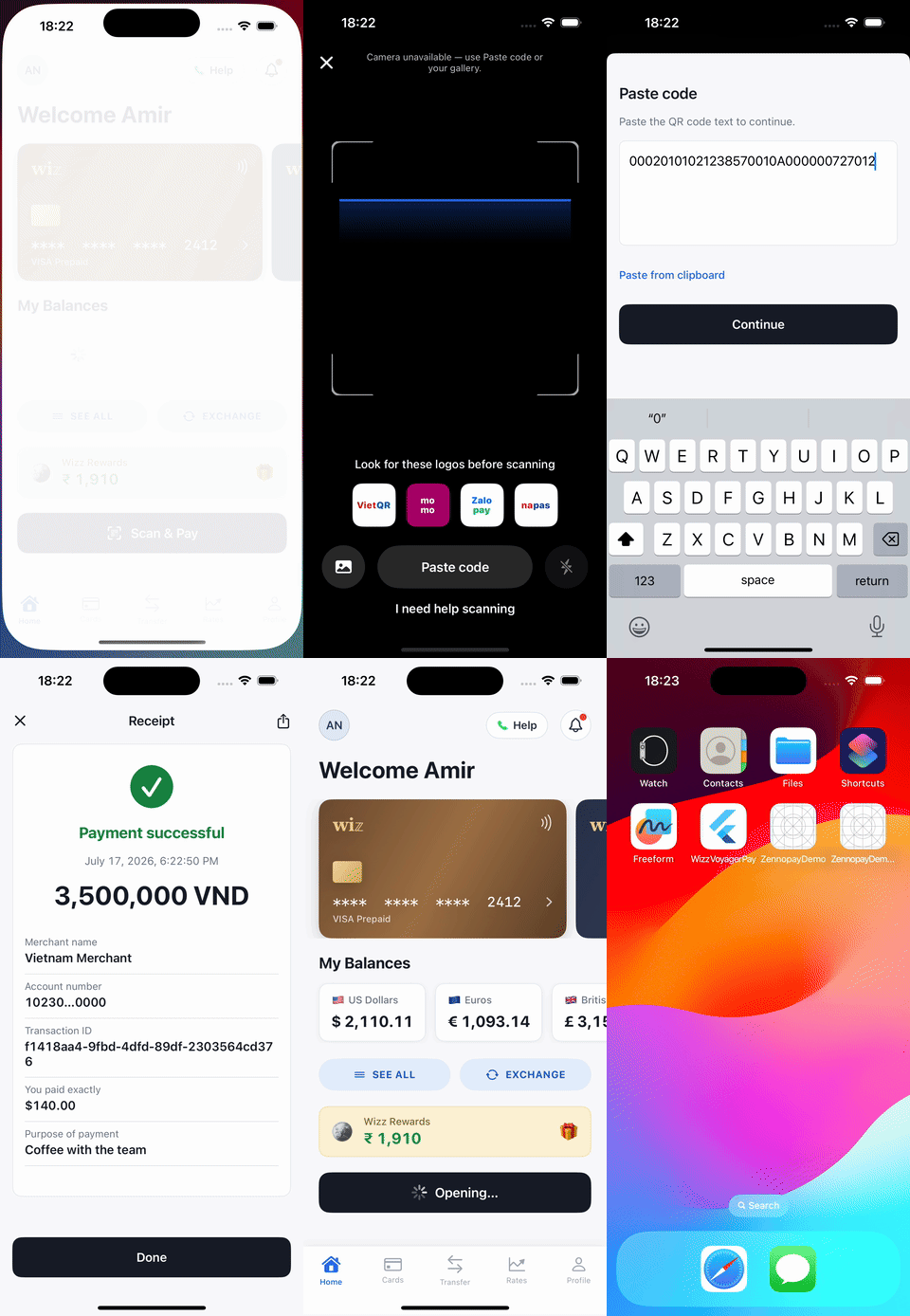
camera scanner, slide-to-pay physics, and confirm/status UI all render
natively — nothing is re-implemented in JS. One `await presentSheet(...)`, one
`PaymentResult`.
It supports both the legacy bridge and the new architecture
(Fabric/TurboModules) — the module is interop-compatible.
## Requirements
* React Native 0.70+, React 17+
* The **native Zennopay SDKs must be linked** (see below) — this package is
the JS surface, not the implementation
* A backend [session endpoint](/payments/session-endpoint) that creates the
intent and returns the Zennopay-minted session token
## Install
```sh theme={null}
npm install @zennopay/react-native
```
### Link the native SDKs
If the native SDK isn't linked, every `presentSheet` call rejects with the
code `native_sdk_unavailable`. This is a build/link problem, not a payment
failure — fix the steps below and rebuild. (Expo Go cannot load the native
module; use a development build.)
**iOS** — the podspec declares a dependency on the native `Zennopay` pod, so
installing pods pulls it in:
```sh theme={null}
cd ios && pod install
```
Then add the camera usage string to `ios/YourApp/Info.plist`:
```xml theme={null}
NSCameraUsageDescriptionScan a merchant QR code to pay.
```
**Android** — the module's Gradle file depends on the native SDK
(`in.zennopay:sdk`, on Maven Central). Make sure `mavenCentral()` is in your
onboarding pack is declared in `android/settings.gradle` alongside `google()`
and `mavenCentral()`. The `CAMERA` permission is merged from the native SDK's
manifest; the SDK requests it at runtime.
Rebuild the app after installing (`npx react-native run-ios` /
`run-android`) — a Metro-only reload will not pick up the native module.
## Configure
```ts theme={null}
// Provider-wide default:
...
// Or per call (overrides the provider):
await presentSheet({
intentId,
sessionToken,
config: { environment: 'sandbox' }, // SANDBOX pill shown
// config: { apiBaseUrl: 'http://localhost:3000' }, // custom gateway
});
```
**Already shipped on `zennopay.in`?** Nothing to do. Previously published SDK
versions resolve the `sandbox` / `production` environments to the
`api.zennopay.in` hosts, and **those hosts continue to be served** — same API,
same credentials. You do not need to ship an app update to stay working. See
[Environments](/api-reference/environments#legacy-domain-hosts).
Your API keys never live in the app: per payment, your backend
[creates the intent](/payments/session-endpoint) and Zennopay returns a session
token. Your backend passes it to your app, and the SDK holds only that
short-lived token.
## Present the PaymentSheet
Wrap your app in `ZennopayProvider` (sets the default environment), then call
`presentSheet` from the `useZennopay()` hook:
```tsx theme={null}
import { ZennopayProvider, useZennopay } from '@zennopay/react-native';
// Root:
export default function App() {
return (
);
}
// In a component:
function PayButton() {
const { presentSheet } = useZennopay();
const onScanAndPay = async () => {
// 1. Ask YOUR backend for a checkout session (intent + session token).
const session = await walletApi.createCheckoutSession();
// 2. Present the native PaymentSheet and await the terminal result.
const result = await presentSheet({
intentId: session.intentId,
sessionToken: session.sessionToken,
refreshSession: async (intentId) => {
// Called on session expiry (401): ask your backend to re-mint a token
// for the SAME intent (POST /v1/payment_intents/:id/session),
// or return null if you can't.
const refreshed = await walletApi.refreshSession(intentId);
return refreshed?.sessionToken ?? null;
},
});
// 3. One terminal case.
switch (result.status) {
case 'completed':
showReceipt(result.receipt); // money moved — debit your ledger
break;
case 'pending':
showPending(); // may still settle — reconcile via webhook/history
break;
case 'canceled':
break; // user backed out; no money moved
case 'failed':
console.warn('payment failed', result.error.code);
break;
}
};
return ;
}
```
There is also an imperative import if you don't want the provider:
```ts theme={null}
import { presentSheet } from '@zennopay/react-native';
const result = await presentSheet({ intentId, sessionToken, config: { environment: 'sandbox' } });
```
## Handle the result
```ts theme={null}
type PaymentResult =
| { status: 'completed'; intentId: string; receipt?: Receipt }
| { status: 'canceled'; intentId: string }
| { status: 'failed'; intentId: string; error: ZennopayError }
| { status: 'pending'; intentId: string; receipt?: Receipt };
```
The promise **rejects** only for integration errors — no presentation
context (`no_presentation_context`) or the native SDK not linked
(`native_sdk_unavailable`). A payment *failure* resolves normally with
`{ status: 'failed', error }`, where `error.code` is a stable string from
the shared taxonomy (`invalid_jwt`, `intent_mismatch`, `jwt_expired`,
`quote_expired`, `limit_exceeded`, `network_error`, `timed_out`, …).
`pending` means status polling timed out — the payment may still settle;
reconcile via your [webhook](/api-reference/webhooks) or transaction history.
## Customize appearance
Theming is a plain JS object, serialized to the native `ZennopayAppearance`:
```ts theme={null}
await presentSheet({
intentId: session.intentId,
sessionToken: session.sessionToken,
appearance: {
mode: 'automatic',
colors: {
primary: '#1B4FD8',
dark: { primary: '#6E8EF5' }, // per-mode overrides
},
cornerRadius: { card: 10, slide: 12 }, // clamped to <= 12 natively
font: { family: 'Inter', scale: 1.0 },
primaryButton: { background: '#1B4FD8', textColor: '#FFFFFF', cornerRadius: 10 },
},
});
```
Omit `appearance` for the default Zennopay look with system light/dark.
Structural rules (radius cap, tabular figures, accent-as-state) are enforced
natively and can't be overridden.
## How the bridge works
* `presentSheet` calls the native module's `present(...)`, which wraps
`Zennopay.presentCheckout` on each platform and resolves exactly once with
the terminal result.
* `refreshSession` is serviced over an event + reply: the native side emits
`ZennopaySessionExpired { intentId }`, the bridge runs your async callback,
and replies with the fresh token — the bridge never blocks.
* The session token crosses the bridge once, into native memory; it is never
placed in a URL. Confirm idempotency, retries, and relaunch recovery are
owned by the native SDKs.
## Test
* **Simulator/emulator:** no usable camera — the native sheet falls back to
paste-QR; paste any VietQR payload string.
* **Sandbox end-to-end:** `{ environment: 'sandbox' }` + a session from your
sandbox backend drives the flow to a real `captured` on the sandbox payout
rail.
* **Link check:** if `presentSheet` rejects with `native_sdk_unavailable`,
re-run `pod install` / a full Gradle build — the JS package is installed but
the native SDK isn't.
The full sandbox checklist — including limit-blocked payments and pending
reconciliation — is in [Test your integration](/payments/testing).
## Next steps
The one backend route the sheet needs.
The sandbox loops to run before release.
Reconcile terminal states server-side.
The corridor limits Zennopay enforces for you.
 ## Requirements
* React Native 0.70+, React 17+
* The **native Zennopay SDKs must be linked** (see below) — this package is
the JS surface, not the implementation
* A backend [session endpoint](/payments/session-endpoint) that creates the
intent and returns the Zennopay-minted session token
## Install
```sh theme={null}
npm install @zennopay/react-native
```
### Link the native SDKs
## Requirements
* React Native 0.70+, React 17+
* The **native Zennopay SDKs must be linked** (see below) — this package is
the JS surface, not the implementation
* A backend [session endpoint](/payments/session-endpoint) that creates the
intent and returns the Zennopay-minted session token
## Install
```sh theme={null}
npm install @zennopay/react-native
```
### Link the native SDKs