> ## Documentation Index
> Fetch the complete documentation index at: https://docs.zennopay.com/llms.txt
> Use this file to discover all available pages before exploring further.
# Zennopay PaymentSheet
> A native, in-process pay experience — scan → amount → slide-to-pay → result — your users never leave your app.
The **PaymentSheet** is Zennopay's prebuilt, native payment UI, modeled on
Stripe's PaymentSheet. Your backend creates a payment intent and Zennopay
returns a short-lived session token; your app hands the intent ID and token to
the SDK in a single call; the SDK renders the entire pay experience — QR scan,
amount + FX quote, slide-to-pay, and result — **natively, in-process**, and
returns one typed `PaymentResult`.
There is no browser tab, no redirect, and no URL scheme. The camera scanner,
slide-to-pay physics, quote refresh, retries, and status polling are all inside
the sheet.
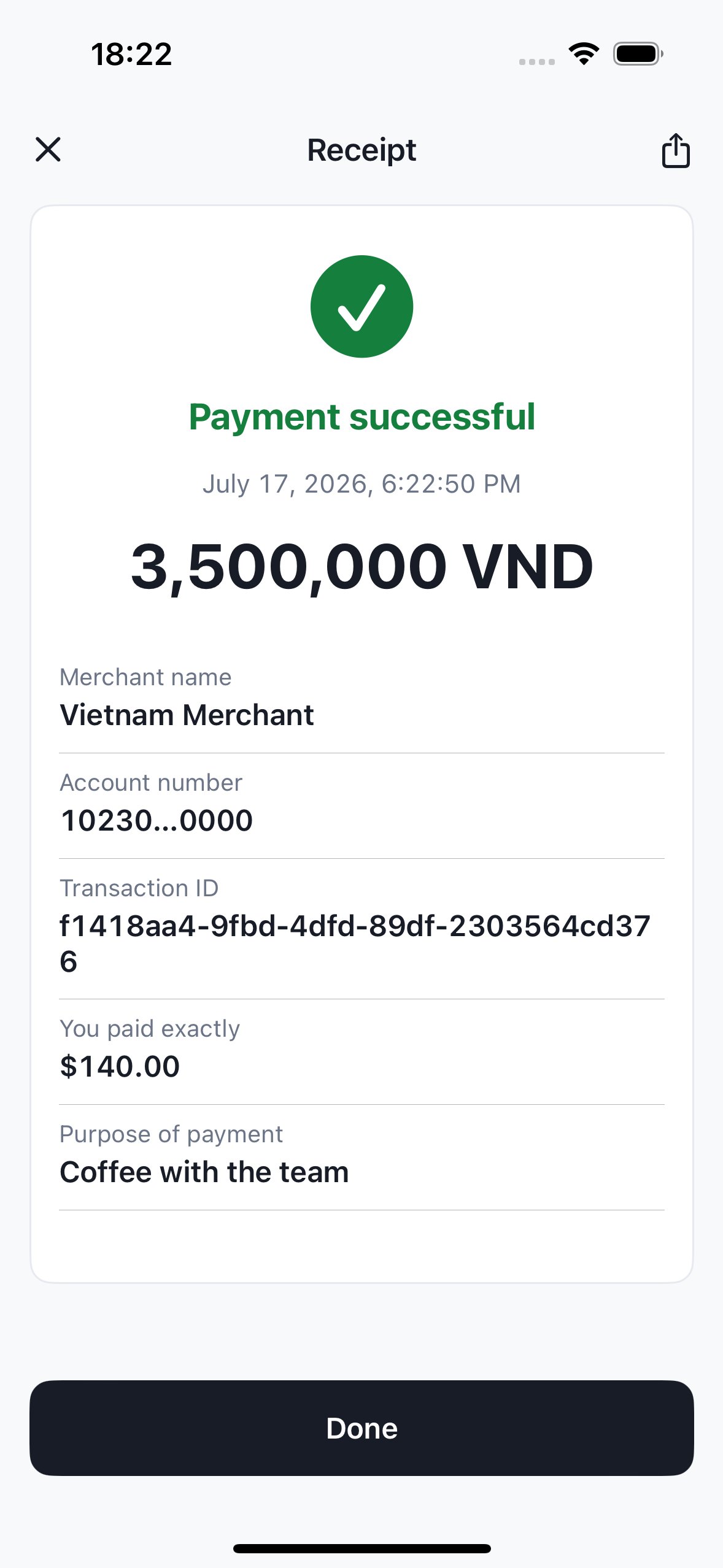
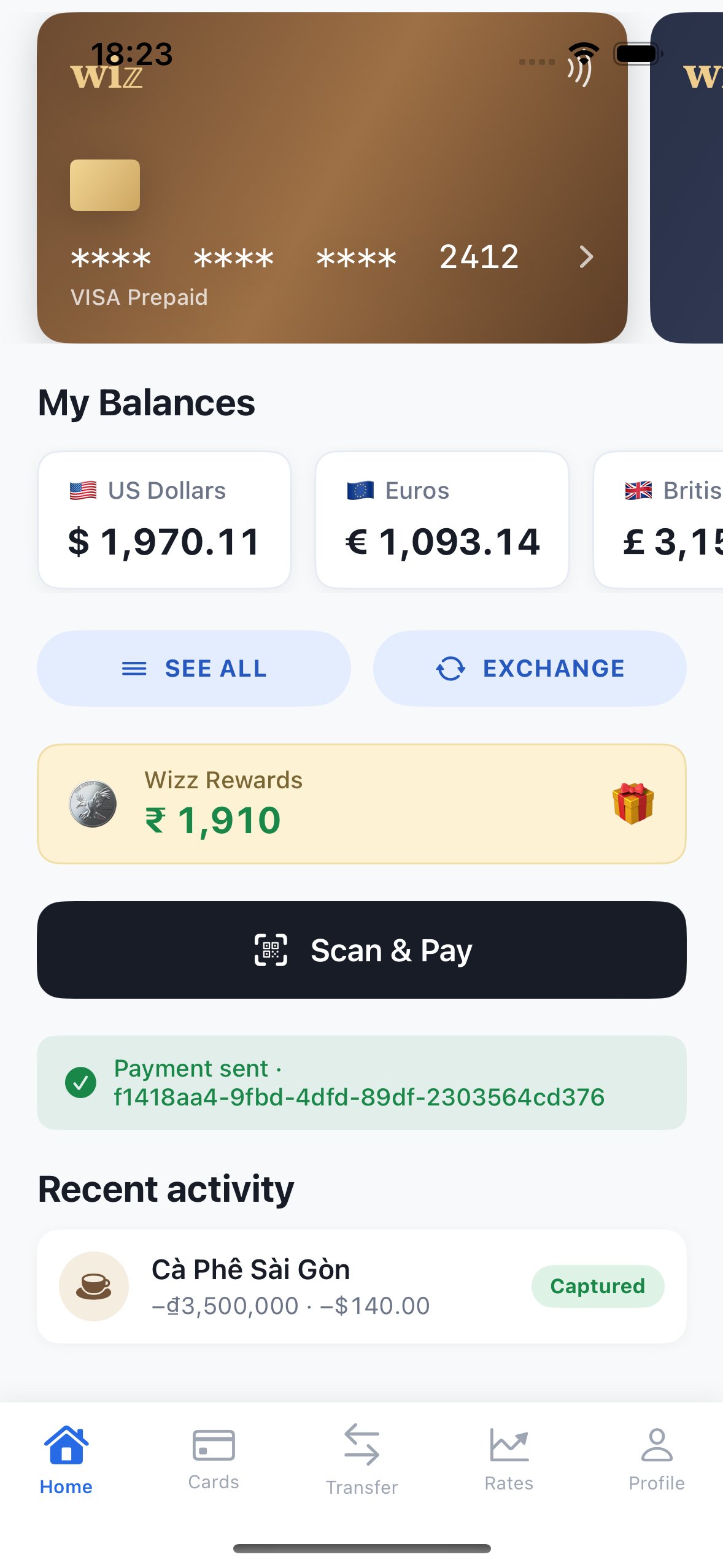
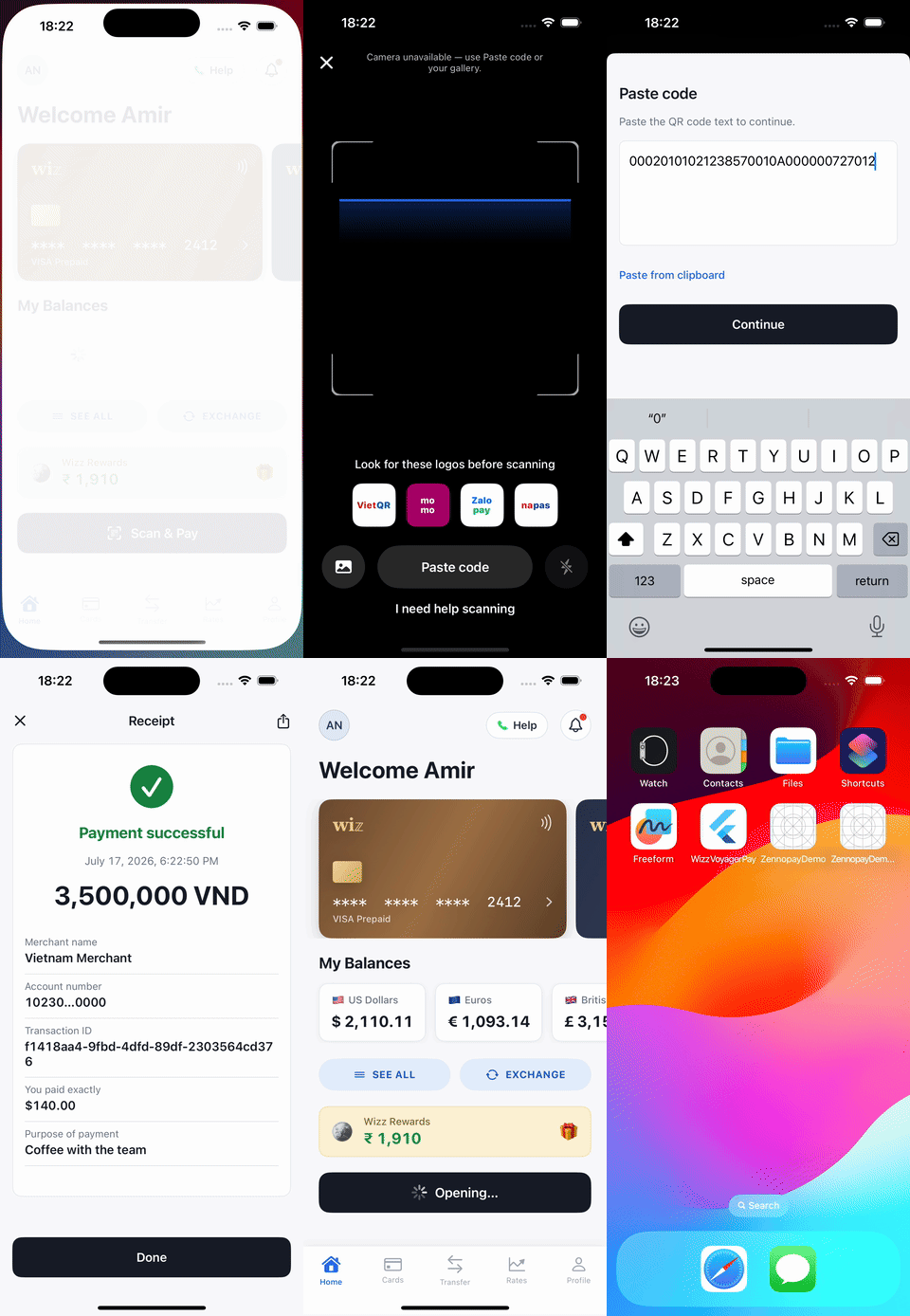 ## The flow, screen by screen
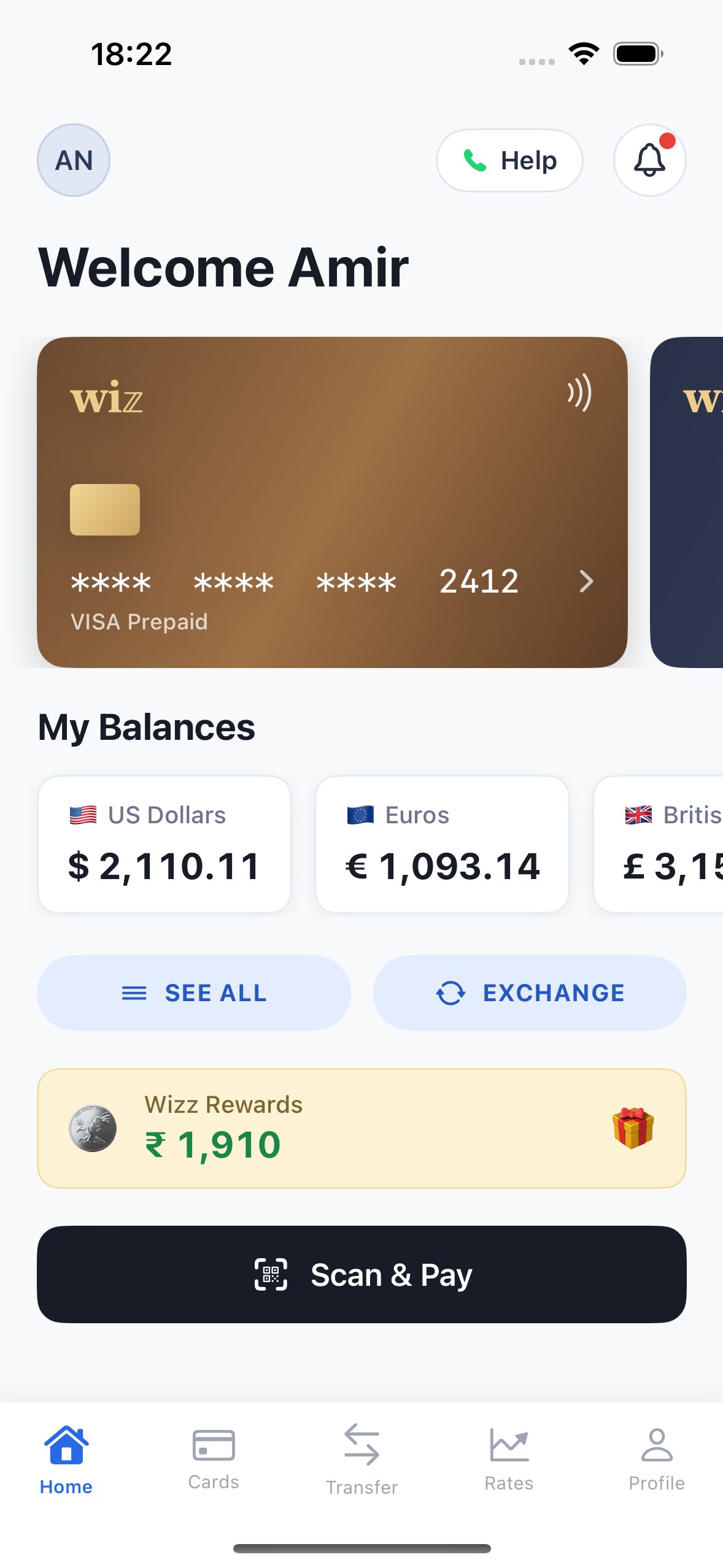
These are real captures from the [sample wallet app](#sample-app) paying a VietQR
merchant in the sandbox.
## The flow, screen by screen
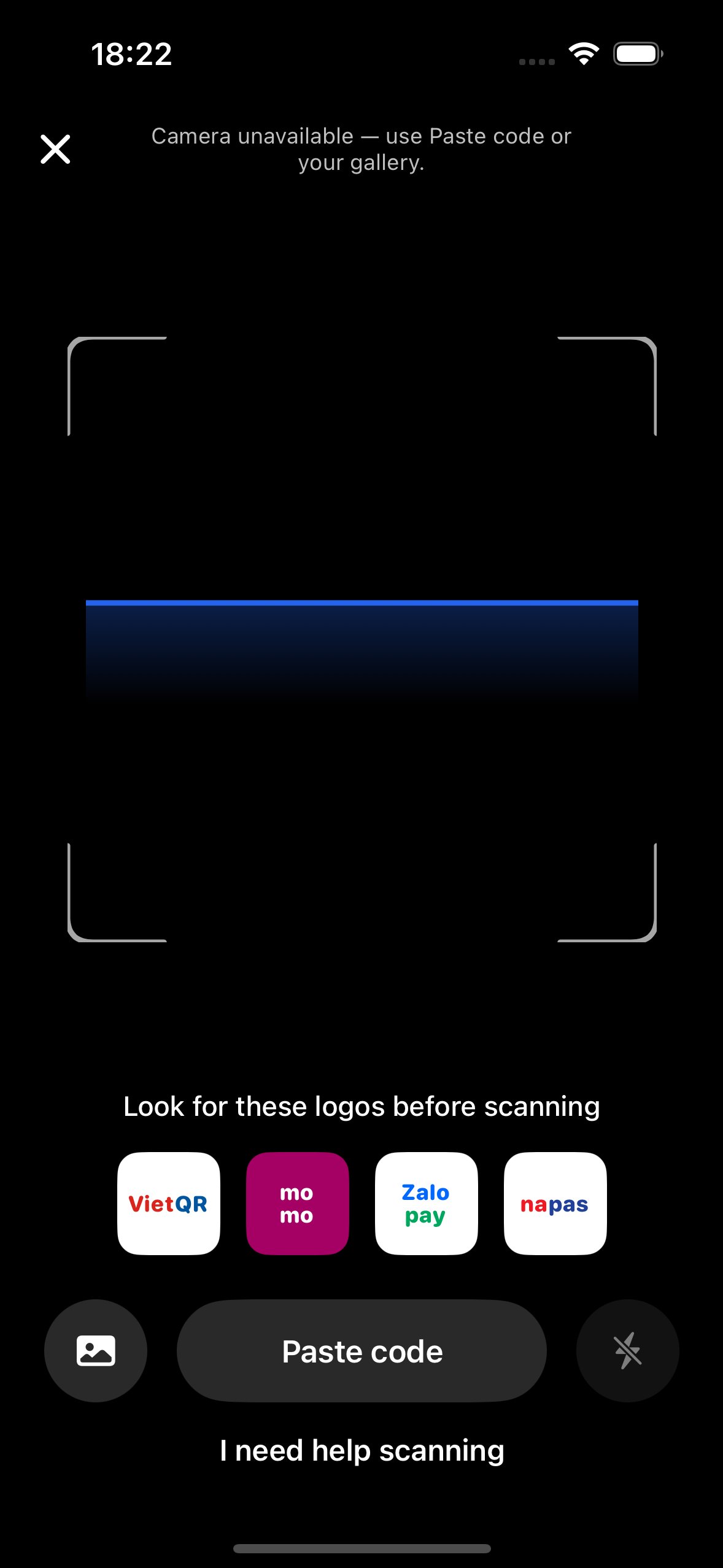
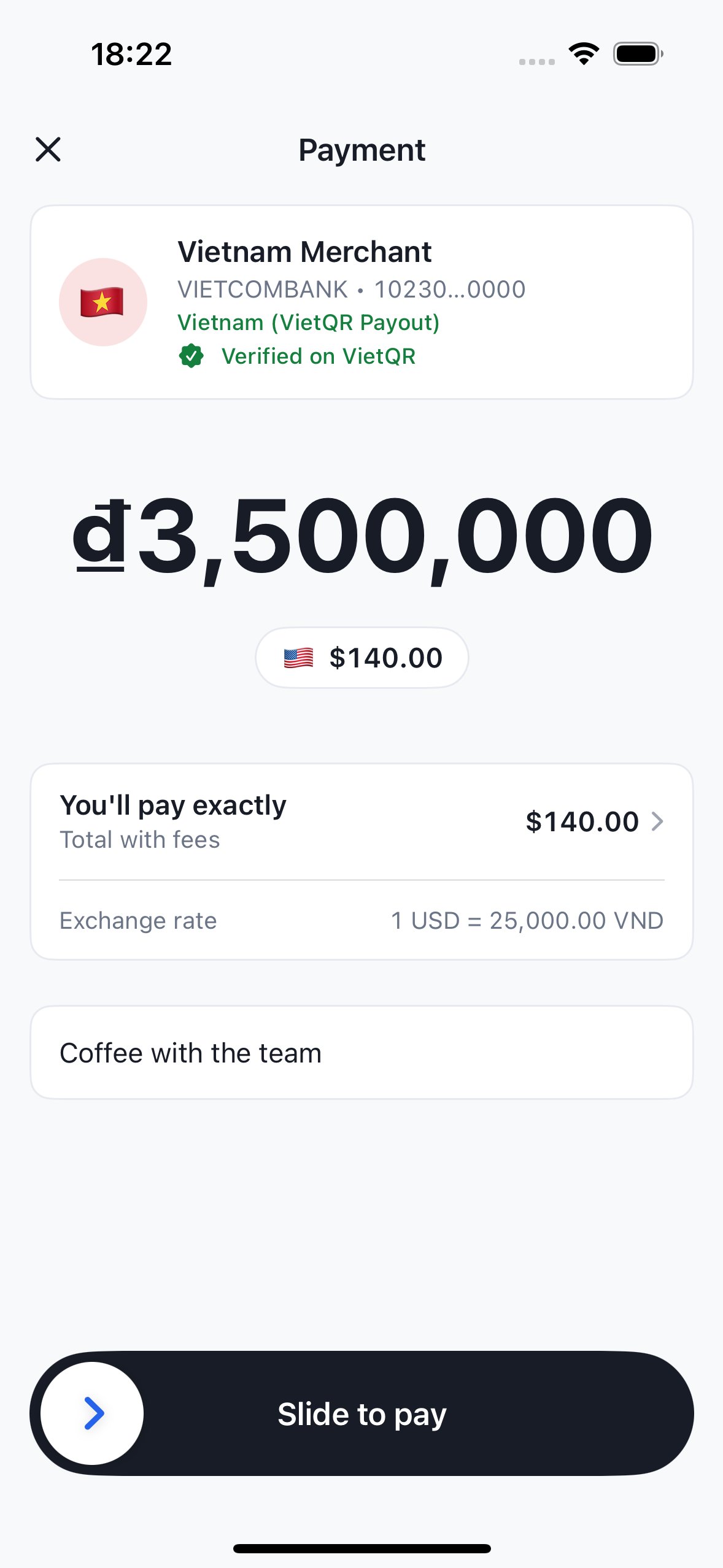
These are real captures from the [sample wallet app](#sample-app) paying a VietQR
merchant in the sandbox.
 ## Pick your platform
| Platform | Package | Install | Minimums |
| -------------------------------------- | --------------------------------- | ----------------------------------------- | --------------------------------- |
| [iOS](/payments/ios) | `Zennopay` (SwiftPM / CocoaPods) | SPM `zennopay-ios-sdk` · `pod 'Zennopay'` | iOS 16, Swift 5.9 |
| [Android](/payments/android) | `in.zennopay:sdk` (Maven Central) | `implementation("in.zennopay:sdk:0.6.0")` | minSdk 24, Compose |
| [Flutter](/payments/flutter) | `zennopay_flutter` (pub.dev) | `zennopay_flutter: ^0.6.0` | Flutter 3.19, Dart 3.4 |
| [React Native](/payments/react-native) | `@zennopay/react-native` (npm) | `npm install @zennopay/react-native` | RN 0.70 (bridges the native SDKs) |
Every platform has the same shape: one `present` call in, one `PaymentResult`
out — `completed` / `canceled` / `failed` / `pending` (delivered when the user
leaves while the payout is still processing, or when polling times out; the
payment resolves asynchronously and unspent funds are released automatically).
## How it works
Per payment, your backend makes one HMAC-signed call — it creates the intent
(passing the user's KYC + sanctions attestations) — and Zennopay returns a
short-lived **session token** bound to that intent. Your app passes the intent
ID and token to the SDK; the SDK talks to the Zennopay API directly with the
session token as `Authorization: Bearer`.
```mermaid theme={null}
sequenceDiagram
autonumber
participant U as User
participant App as Partner app
## Pick your platform
| Platform | Package | Install | Minimums |
| -------------------------------------- | --------------------------------- | ----------------------------------------- | --------------------------------- |
| [iOS](/payments/ios) | `Zennopay` (SwiftPM / CocoaPods) | SPM `zennopay-ios-sdk` · `pod 'Zennopay'` | iOS 16, Swift 5.9 |
| [Android](/payments/android) | `in.zennopay:sdk` (Maven Central) | `implementation("in.zennopay:sdk:0.6.0")` | minSdk 24, Compose |
| [Flutter](/payments/flutter) | `zennopay_flutter` (pub.dev) | `zennopay_flutter: ^0.6.0` | Flutter 3.19, Dart 3.4 |
| [React Native](/payments/react-native) | `@zennopay/react-native` (npm) | `npm install @zennopay/react-native` | RN 0.70 (bridges the native SDKs) |
Every platform has the same shape: one `present` call in, one `PaymentResult`
out — `completed` / `canceled` / `failed` / `pending` (delivered when the user
leaves while the payout is still processing, or when polling times out; the
payment resolves asynchronously and unspent funds are released automatically).
## How it works
Per payment, your backend makes one HMAC-signed call — it creates the intent
(passing the user's KYC + sanctions attestations) — and Zennopay returns a
short-lived **session token** bound to that intent. Your app passes the intent
ID and token to the SDK; the SDK talks to the Zennopay API directly with the
session token as `Authorization: Bearer`.
```mermaid theme={null}
sequenceDiagram
autonumber
participant U as User
participant App as Partner app
(+ PaymentSheet SDK)
participant BE as Partner backend
participant ZP as Zennopay API
participant Rail as Local payout rail
(Vietnam)
U->>App: Tap "Scan & Pay"
App->>BE: POST /wallet/checkout-session
BE->>ZP: POST /v1/payment_intents (HMAC-signed + attestations)
ZP-->>BE: intent_id + session_token (short-lived, single-use)
BE-->>App: intent_id + session token
App->>App: Zennopay.presentCheckout(intentId, sessionToken)
U->>App: Scan merchant QR
App->>ZP: POST /v1/payment_intents/:id/scan (Bearer)
ZP-->>App: merchant + quote-bound amount (VND + USD)
U->>App: Slide to pay
App->>ZP: POST /v1/payment_intents/:id/confirm (Bearer, Idempotency-Key)
ZP->>Rail: Payout to merchant's bank
App->>ZP: GET /v1/payment_intents/:id (poll to terminal)
ZP-->>App: status: captured
App-->>U: "Payment sent" → sheet dismisses
App->>App: onResult(.completed(intentId))
ZP-->>BE: webhook: payment_intent.captured
```
Creating the intent and returning the session token is the only backend work.
It is documented end to end, with a complete Node.js reference
implementation, in [Build your session endpoint](/payments/session-endpoint).
**Trust model.** Your **publishable key** (`pk_...`) identifies your app and
is safe to ship in a binary. Your **secret key** (`sk_...`) HMAC-signs
server-to-server calls and never leaves your backend. The **session token** the
SDK holds is minted by Zennopay, scoped to a single intent, short-lived, and
opaque to you. There is no partner key pair to generate. Both keys come from
the Zennopay Console → **Developers** tab.
## What you don't build
The SDK owns the entire payment surface, so you never build:
* **A QR scanner** — camera capture, torch, gallery import, and a paste-QR
fallback (which also makes the flow testable on simulators).
* **EMVCo parsing** — the raw payload is validated authoritatively server-side
(CRC, tags, merchant extraction). VietQR today, PromptPay next.
* **FX quoting UI** — the sheet shows the bound local amount and the exact USD
wallet debit, and silently re-quotes when a quote expires.
* **A confirm surface** — slide-to-pay fires the confirm exactly once, with an
idempotency key persisted before the network call.
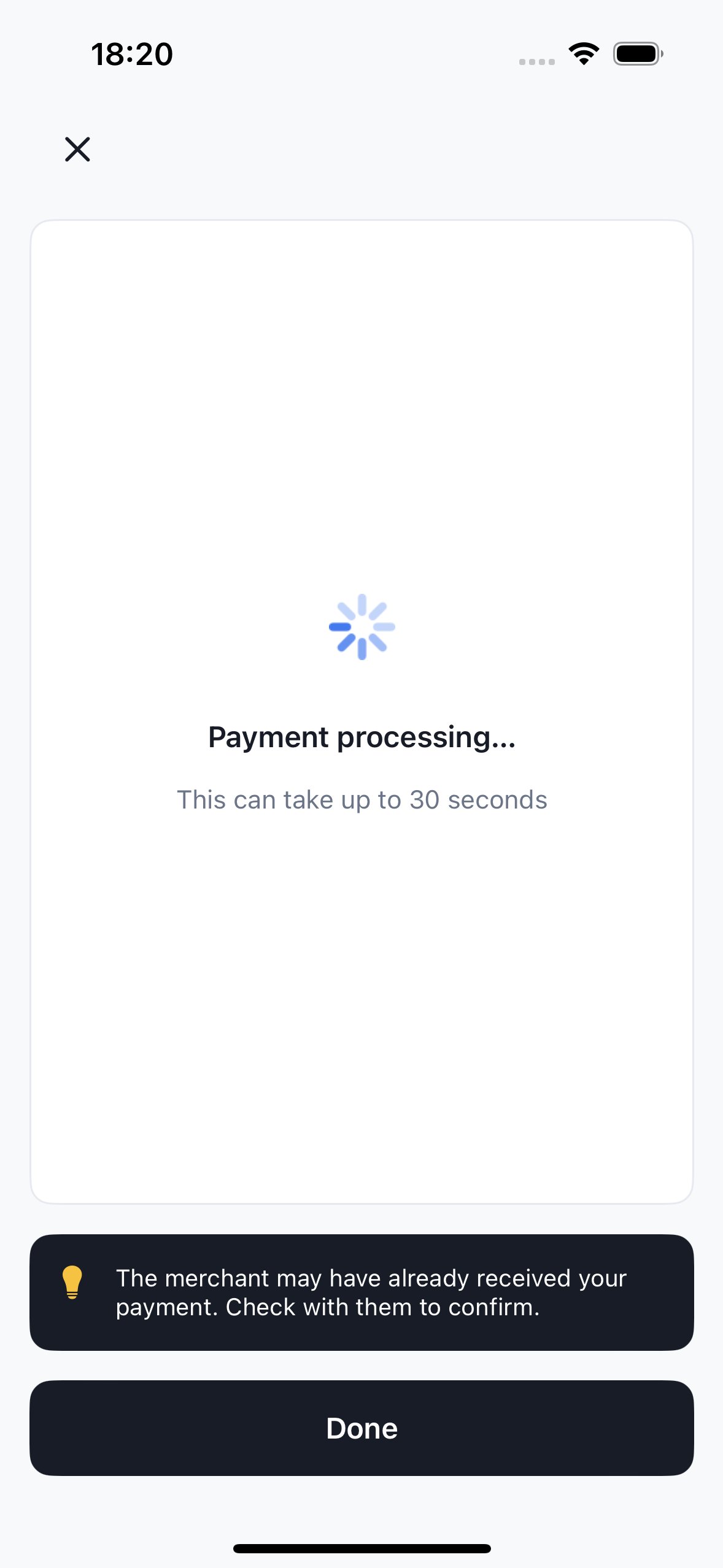
* **Status polling, retries, and recovery** — including re-minting an expired
session via your `refreshSession` hook and recovering the true terminal
state after a process death mid-confirm. Slow payouts get a processing
state with honest copy, a "taking longer than usual" escalation, and a
`pending` result if the user leaves early:
 * **Per-user regulatory limits** — Zennopay enforces
[corridor limits](/fundamentals/limits) automatically (Vietnam: ₫5,000,000
per transaction, ₫10,000,000 per day, ₫25,000,000 per month per user) and
the sheet renders the right copy.
* **New corridors** — when a corridor lights up (Thailand PromptPay is next),
existing integrations get it with zero client work.
* **The receipt surface** — you keep your own transaction-history list, but you
never build the authoritative receipt view. When a user taps a past payment,
[`presentReceipt`](/payments/reopen-receipt) reopens the branded Zennopay
receipt with its *live* status (pending, captured, failed, or refunded).
## Sample app
The screenshots above come from the Zennopay sample wallet app — a reference
integration that exercises the [session endpoint contract](/payments/session-endpoint)
and the `presentCheckout` call against the sandbox. Ask your Zennopay
integration engineer for the sample project.
## Migrating from hosted checkout (beta)
The beta hosted-checkout model — a browser tab via
`ASWebAuthenticationSession` / Chrome Custom Tabs with a URL-scheme redirect —
is **deprecated and removed**. `Zennopay.openCheckout(...)` and the
registered URL scheme are gone. Replace the call with
`presentCheckout` / `presentSheet`, delete your URL-scheme registration, and
add the camera usage declaration. See the migration notes at the top of the
[iOS](/payments/ios) and [Android](/payments/android) pages.
## Next steps
The one backend route every payment starts with.
You keep your history list; the SDK reopens the authoritative receipt.
The sandbox loops to run before release.
* **Per-user regulatory limits** — Zennopay enforces
[corridor limits](/fundamentals/limits) automatically (Vietnam: ₫5,000,000
per transaction, ₫10,000,000 per day, ₫25,000,000 per month per user) and
the sheet renders the right copy.
* **New corridors** — when a corridor lights up (Thailand PromptPay is next),
existing integrations get it with zero client work.
* **The receipt surface** — you keep your own transaction-history list, but you
never build the authoritative receipt view. When a user taps a past payment,
[`presentReceipt`](/payments/reopen-receipt) reopens the branded Zennopay
receipt with its *live* status (pending, captured, failed, or refunded).
## Sample app
The screenshots above come from the Zennopay sample wallet app — a reference
integration that exercises the [session endpoint contract](/payments/session-endpoint)
and the `presentCheckout` call against the sandbox. Ask your Zennopay
integration engineer for the sample project.
## Migrating from hosted checkout (beta)
The beta hosted-checkout model — a browser tab via
`ASWebAuthenticationSession` / Chrome Custom Tabs with a URL-scheme redirect —
is **deprecated and removed**. `Zennopay.openCheckout(...)` and the
registered URL scheme are gone. Replace the call with
`presentCheckout` / `presentSheet`, delete your URL-scheme registration, and
add the camera usage declaration. See the migration notes at the top of the
[iOS](/payments/ios) and [Android](/payments/android) pages.
## Next steps
The one backend route every payment starts with.
You keep your history list; the SDK reopens the authoritative receipt.
The sandbox loops to run before release.