> ## Documentation Index
> Fetch the complete documentation index at: https://docs.zennopay.com/llms.txt
> Use this file to discover all available pages before exploring further.
# iOS
> Present the native Zennopay PaymentSheet from your iOS app with one call.
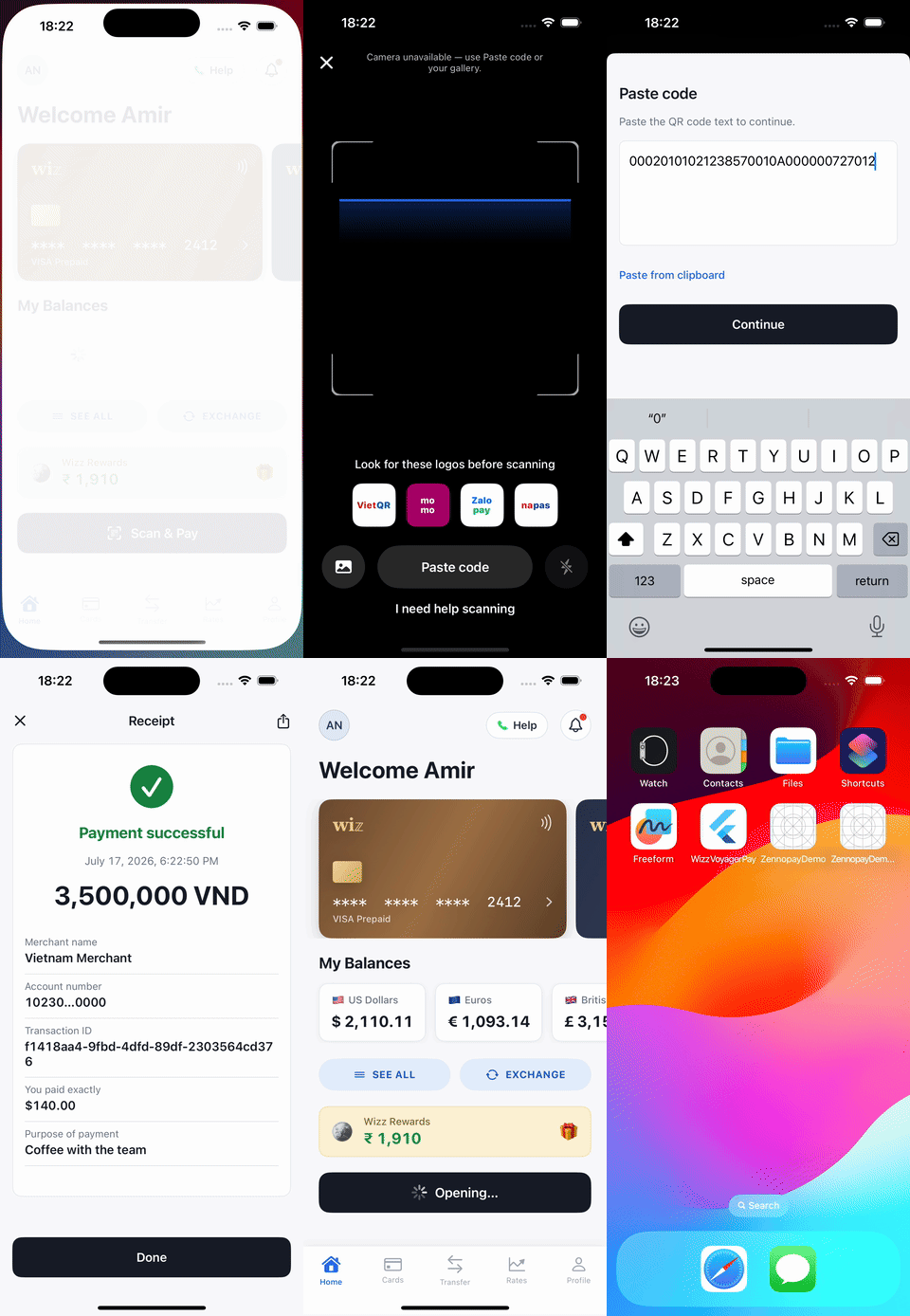
The Zennopay iOS SDK presents the [PaymentSheet](/payments/overview) — the full
native pay experience (QR scan → amount + FX quote → slide-to-pay → result) —
modally over your view controller, and delivers exactly one typed
`PaymentResult` to your callback. It is SwiftUI under the hood, dependency-free,
and works from both UIKit and SwiftUI hosts.
 **Migrating from hosted checkout (beta)?** `Zennopay.openCheckout(...)`, the
browser tab, and the URL-scheme redirect are gone. Replace the call with
`Zennopay.presentCheckout(...)` below, delete the `CFBundleURLTypes` entry
you registered for `yourapp://payment-result`, and add
`NSCameraUsageDescription` to your Info.plist. Your app passes the
Zennopay-minted session token to `presentCheckout` (see below).
## Requirements
* iOS 16.0+ (the presented flow uses modern SwiftUI APIs)
* Swift 5.9+ / Xcode 15+
* No third-party dependencies
* A backend [session endpoint](/payments/session-endpoint) that creates the
intent and returns the Zennopay-minted session token
## Install
In Xcode: **File → Add Package Dependencies…** and paste:
```
https://github.com/Zennopay/zennopay-ios-sdk
```
Select **Up to Next Major Version**, then add the `Zennopay` library product to
your app target. Or, in your own `Package.swift`:
```swift theme={null}
dependencies: [
.package(url: "https://github.com/Zennopay/zennopay-ios-sdk", from: "0.6.0")
],
targets: [
.target(name: "YourApp", dependencies: ["Zennopay"])
]
```
Or with **CocoaPods** — add to your `Podfile` and run `pod install`:
```ruby theme={null}
pod 'Zennopay', '~> 0.6.0'
```
### Declare camera usage
The sheet opens on a live camera scanner. iOS reads the permission prompt's
usage string from **your** app bundle, so add to your `Info.plist`:
```xml theme={null}
NSCameraUsageDescription
Scan a merchant QR code to pay.
```
If the user denies camera access (or the device has no camera), the sheet
automatically falls back to a paste-QR-data field — the flow is always
completable without a camera.
## Configure
`ZennopayConfig` selects the environment. It is a value, never a code path —
one integration serves testing and production:
```swift theme={null}
// Sandbox/testing (the default). Shows a "SANDBOX" pill in the sheet header.
config: .sandbox // https://api.sandbox.zennopay.com
// Live traffic. Real money, no sandbox chrome.
config: .production // https://api.zennopay.com
// Custom gateway (local development, pentest):
config: ZennopayConfig(apiBaseURL: URL(string: "http://localhost:3000")!)
```
**Already shipped on `zennopay.in`?** Nothing to do. Previously published SDK
versions resolve `.sandbox` / `.production` to the `api.zennopay.in` hosts,
and **those hosts continue to be served** — same API, same credentials. You do
not need to ship an app update to stay working. See
[Environments](/api-reference/environments#legacy-domain-hosts).
Your API keys never live in the app: per payment, your backend
[creates the intent](/payments/session-endpoint) and Zennopay returns a session
token. Your backend passes it to your app, and the SDK holds only that
short-lived token.
## Present the PaymentSheet
With a checkout session from your backend in hand, your app makes one call:
```swift theme={null}
import UIKit
import Zennopay
final class WalletViewController: UIViewController {
struct CheckoutSession: Decodable {
let intentId: String
let sessionToken: String
}
@IBAction func scanAndPayTapped() {
Task { @MainActor in
// 1. Ask YOUR backend for a checkout session.
// It creates the payment intent (server-to-server, HMAC-signed);
// Zennopay returns a short-lived session token bound to it.
let session: CheckoutSession = try await api.post("/wallet/checkout-session")
// 2. Present the PaymentSheet. The SDK owns everything from here
// until the terminal result.
Zennopay.presentCheckout(
from: self,
intentID: session.intentId,
sessionToken: session.sessionToken,
refreshSession: { intentID in
// Called if the session expires mid-flow (401). Ask your
// backend to re-mint a fresh token for the SAME intent
// (POST /v1/payment_intents/:id/session), or return nil if
// you can't (the SDK then surfaces an auth failure).
let refreshed: CheckoutSession? = try? await api.post(
"/wallet/checkout-session/\(intentID)/refresh")
return refreshed?.sessionToken
},
config: .sandbox // .production for live traffic
) { result in
// 3. Delivered exactly once, on the main queue.
switch result {
case .completed(let intentID):
// Money moved: debit your ledger, show your receipt row.
self.showReceipt(intentID: intentID)
case .canceled:
// User backed out before confirming. No money moved.
break
case .failed(let intentID, let error):
// Terminal failure — the sheet already showed the user a
// plain-language reason. Log for support.
self.log("payment failed", intentID, error)
}
}
}
}
}
```
That's the whole client integration. The SDK validates the session token's
structure, expiry, and intent binding **before** presenting any UI, so a
mis-paired token fails fast with `.failed` instead of an empty sheet.
`presentCheckout` is `@MainActor` and needs a host view controller. From
SwiftUI, present from the top-most `UIViewController` (via a small
`UIViewControllerRepresentable` or your scene's root controller) — the
sample wallet app ships a compact helper for exactly this.
## Handle the result
```swift theme={null}
public enum PaymentResult: Equatable, Sendable {
/// Wallet debited, payout captured.
case completed(intentID: String)
/// Terminal non-success, or an unrecoverable in-sheet failure.
case failed(intentID: String, error: ZennopayError)
/// User dismissed before a terminal outcome. No money moved.
case canceled(intentID: String)
}
```
`ZennopayError` is a typed taxonomy (`invalidJWT`, `intentMismatch`,
`jwtExpired`, `sessionExpired`, `quoteExpired`, `paymentFailed`, `timedOut`,
`networkError`, …). On `.timedOut` the payment is effectively *pending* — it
may still settle. Show a soft state and reconcile via your
[webhook](/api-reference/webhooks) or `GET /v1/payment_intents/:id` rather
than assuming a terminal failure.
## Customize appearance
`ZennopayAppearance` themes the sheet to match your app — colors, corner radii,
font, primary button, and an optional logo in the sheet header. Pass nothing
and you get the default Zennopay look, following system light/dark.
```swift theme={null}
var appearance = ZennopayAppearance()
appearance.colors.primary = UIColor(named: "BrandGreen")!
appearance.cornerRadius = .init(input: 6, card: 10, slide: 12)
appearance.font = .init(family: "Inter", scale: 1.0)
appearance.primaryButton = .init(
background: UIColor(named: "BrandGreen")!,
textColor: .white,
cornerRadius: 10
)
appearance.logo = UIImage(named: "wordmark")
Zennopay.presentCheckout(
from: self,
intentID: session.intentId,
sessionToken: session.sessionToken,
appearance: appearance,
config: .production
) { result in /* … */ }
```
Structural rules are not overridable: corner radii are clamped to ≤ 12 pt,
amounts always render in tabular figures, and the accent color is reserved
for state signals. The sheet can be branded, not restyled into a different
product.
## Test
The Simulator has no camera. The sheet detects this and swaps the viewport for
the **paste-QR** fallback automatically — paste any VietQR/EMVCo payload string
and the flow proceeds identically (the backend does the authoritative parse
either way). Two useful loops:
1. **Sandbox end-to-end:** run against `.sandbox` with a session from your
sandbox backend and a real VietQR payload; the payout runs on the sandbox
rail and the intent reaches `captured`.
2. **Fail-fast checks:** pass an empty or mismatched session token and assert
you get an immediate `.failed(.invalidJWT)` / `.failed(.intentMismatch)`
with no UI.
On a physical device, camera scanning and the fallbacks are exercised for
real — that's the pre-release checklist. The full sandbox checklist —
including limit-blocked payments and pending reconciliation — is in
[Test your integration](/payments/testing).
## Under the hood (what you can rely on)
* The session token lives **in memory only** and is sent as
`Authorization: Bearer` on every call — it is never placed in a URL.
* Slide-to-pay fires `POST /confirm` **exactly once**; the idempotency key is
persisted before the network call, so retries and process deaths can never
double-debit.
* On relaunch mid-payment, the SDK recovers the true terminal status with a
`GET` rather than re-confirming.
## Next steps
The one backend route the sheet needs.
The sandbox loops to run before release.
Reconcile terminal states server-side.
The corridor limits Zennopay enforces for you.
**Migrating from hosted checkout (beta)?** `Zennopay.openCheckout(...)`, the
browser tab, and the URL-scheme redirect are gone. Replace the call with
`Zennopay.presentCheckout(...)` below, delete the `CFBundleURLTypes` entry
you registered for `yourapp://payment-result`, and add
`NSCameraUsageDescription` to your Info.plist. Your app passes the
Zennopay-minted session token to `presentCheckout` (see below).
## Requirements
* iOS 16.0+ (the presented flow uses modern SwiftUI APIs)
* Swift 5.9+ / Xcode 15+
* No third-party dependencies
* A backend [session endpoint](/payments/session-endpoint) that creates the
intent and returns the Zennopay-minted session token
## Install
In Xcode: **File → Add Package Dependencies…** and paste:
```
https://github.com/Zennopay/zennopay-ios-sdk
```
Select **Up to Next Major Version**, then add the `Zennopay` library product to
your app target. Or, in your own `Package.swift`:
```swift theme={null}
dependencies: [
.package(url: "https://github.com/Zennopay/zennopay-ios-sdk", from: "0.6.0")
],
targets: [
.target(name: "YourApp", dependencies: ["Zennopay"])
]
```
Or with **CocoaPods** — add to your `Podfile` and run `pod install`:
```ruby theme={null}
pod 'Zennopay', '~> 0.6.0'
```
### Declare camera usage
The sheet opens on a live camera scanner. iOS reads the permission prompt's
usage string from **your** app bundle, so add to your `Info.plist`:
```xml theme={null}
NSCameraUsageDescription
Scan a merchant QR code to pay.
```
If the user denies camera access (or the device has no camera), the sheet
automatically falls back to a paste-QR-data field — the flow is always
completable without a camera.
## Configure
`ZennopayConfig` selects the environment. It is a value, never a code path —
one integration serves testing and production:
```swift theme={null}
// Sandbox/testing (the default). Shows a "SANDBOX" pill in the sheet header.
config: .sandbox // https://api.sandbox.zennopay.com
// Live traffic. Real money, no sandbox chrome.
config: .production // https://api.zennopay.com
// Custom gateway (local development, pentest):
config: ZennopayConfig(apiBaseURL: URL(string: "http://localhost:3000")!)
```
**Already shipped on `zennopay.in`?** Nothing to do. Previously published SDK
versions resolve `.sandbox` / `.production` to the `api.zennopay.in` hosts,
and **those hosts continue to be served** — same API, same credentials. You do
not need to ship an app update to stay working. See
[Environments](/api-reference/environments#legacy-domain-hosts).
Your API keys never live in the app: per payment, your backend
[creates the intent](/payments/session-endpoint) and Zennopay returns a session
token. Your backend passes it to your app, and the SDK holds only that
short-lived token.
## Present the PaymentSheet
With a checkout session from your backend in hand, your app makes one call:
```swift theme={null}
import UIKit
import Zennopay
final class WalletViewController: UIViewController {
struct CheckoutSession: Decodable {
let intentId: String
let sessionToken: String
}
@IBAction func scanAndPayTapped() {
Task { @MainActor in
// 1. Ask YOUR backend for a checkout session.
// It creates the payment intent (server-to-server, HMAC-signed);
// Zennopay returns a short-lived session token bound to it.
let session: CheckoutSession = try await api.post("/wallet/checkout-session")
// 2. Present the PaymentSheet. The SDK owns everything from here
// until the terminal result.
Zennopay.presentCheckout(
from: self,
intentID: session.intentId,
sessionToken: session.sessionToken,
refreshSession: { intentID in
// Called if the session expires mid-flow (401). Ask your
// backend to re-mint a fresh token for the SAME intent
// (POST /v1/payment_intents/:id/session), or return nil if
// you can't (the SDK then surfaces an auth failure).
let refreshed: CheckoutSession? = try? await api.post(
"/wallet/checkout-session/\(intentID)/refresh")
return refreshed?.sessionToken
},
config: .sandbox // .production for live traffic
) { result in
// 3. Delivered exactly once, on the main queue.
switch result {
case .completed(let intentID):
// Money moved: debit your ledger, show your receipt row.
self.showReceipt(intentID: intentID)
case .canceled:
// User backed out before confirming. No money moved.
break
case .failed(let intentID, let error):
// Terminal failure — the sheet already showed the user a
// plain-language reason. Log for support.
self.log("payment failed", intentID, error)
}
}
}
}
}
```
That's the whole client integration. The SDK validates the session token's
structure, expiry, and intent binding **before** presenting any UI, so a
mis-paired token fails fast with `.failed` instead of an empty sheet.
`presentCheckout` is `@MainActor` and needs a host view controller. From
SwiftUI, present from the top-most `UIViewController` (via a small
`UIViewControllerRepresentable` or your scene's root controller) — the
sample wallet app ships a compact helper for exactly this.
## Handle the result
```swift theme={null}
public enum PaymentResult: Equatable, Sendable {
/// Wallet debited, payout captured.
case completed(intentID: String)
/// Terminal non-success, or an unrecoverable in-sheet failure.
case failed(intentID: String, error: ZennopayError)
/// User dismissed before a terminal outcome. No money moved.
case canceled(intentID: String)
}
```
`ZennopayError` is a typed taxonomy (`invalidJWT`, `intentMismatch`,
`jwtExpired`, `sessionExpired`, `quoteExpired`, `paymentFailed`, `timedOut`,
`networkError`, …). On `.timedOut` the payment is effectively *pending* — it
may still settle. Show a soft state and reconcile via your
[webhook](/api-reference/webhooks) or `GET /v1/payment_intents/:id` rather
than assuming a terminal failure.
## Customize appearance
`ZennopayAppearance` themes the sheet to match your app — colors, corner radii,
font, primary button, and an optional logo in the sheet header. Pass nothing
and you get the default Zennopay look, following system light/dark.
```swift theme={null}
var appearance = ZennopayAppearance()
appearance.colors.primary = UIColor(named: "BrandGreen")!
appearance.cornerRadius = .init(input: 6, card: 10, slide: 12)
appearance.font = .init(family: "Inter", scale: 1.0)
appearance.primaryButton = .init(
background: UIColor(named: "BrandGreen")!,
textColor: .white,
cornerRadius: 10
)
appearance.logo = UIImage(named: "wordmark")
Zennopay.presentCheckout(
from: self,
intentID: session.intentId,
sessionToken: session.sessionToken,
appearance: appearance,
config: .production
) { result in /* … */ }
```
Structural rules are not overridable: corner radii are clamped to ≤ 12 pt,
amounts always render in tabular figures, and the accent color is reserved
for state signals. The sheet can be branded, not restyled into a different
product.
## Test
The Simulator has no camera. The sheet detects this and swaps the viewport for
the **paste-QR** fallback automatically — paste any VietQR/EMVCo payload string
and the flow proceeds identically (the backend does the authoritative parse
either way). Two useful loops:
1. **Sandbox end-to-end:** run against `.sandbox` with a session from your
sandbox backend and a real VietQR payload; the payout runs on the sandbox
rail and the intent reaches `captured`.
2. **Fail-fast checks:** pass an empty or mismatched session token and assert
you get an immediate `.failed(.invalidJWT)` / `.failed(.intentMismatch)`
with no UI.
On a physical device, camera scanning and the fallbacks are exercised for
real — that's the pre-release checklist. The full sandbox checklist —
including limit-blocked payments and pending reconciliation — is in
[Test your integration](/payments/testing).
## Under the hood (what you can rely on)
* The session token lives **in memory only** and is sent as
`Authorization: Bearer` on every call — it is never placed in a URL.
* Slide-to-pay fires `POST /confirm` **exactly once**; the idempotency key is
persisted before the network call, so retries and process deaths can never
double-debit.
* On relaunch mid-payment, the SDK recovers the true terminal status with a
`GET` rather than re-confirming.
## Next steps
The one backend route the sheet needs.
The sandbox loops to run before release.
Reconcile terminal states server-side.
The corridor limits Zennopay enforces for you.