> ## Documentation Index
> Fetch the complete documentation index at: https://docs.zennopay.com/llms.txt
> Use this file to discover all available pages before exploring further.
# Flutter
> Present the Zennopay PaymentSheet from Flutter — one await, one PaymentResult.
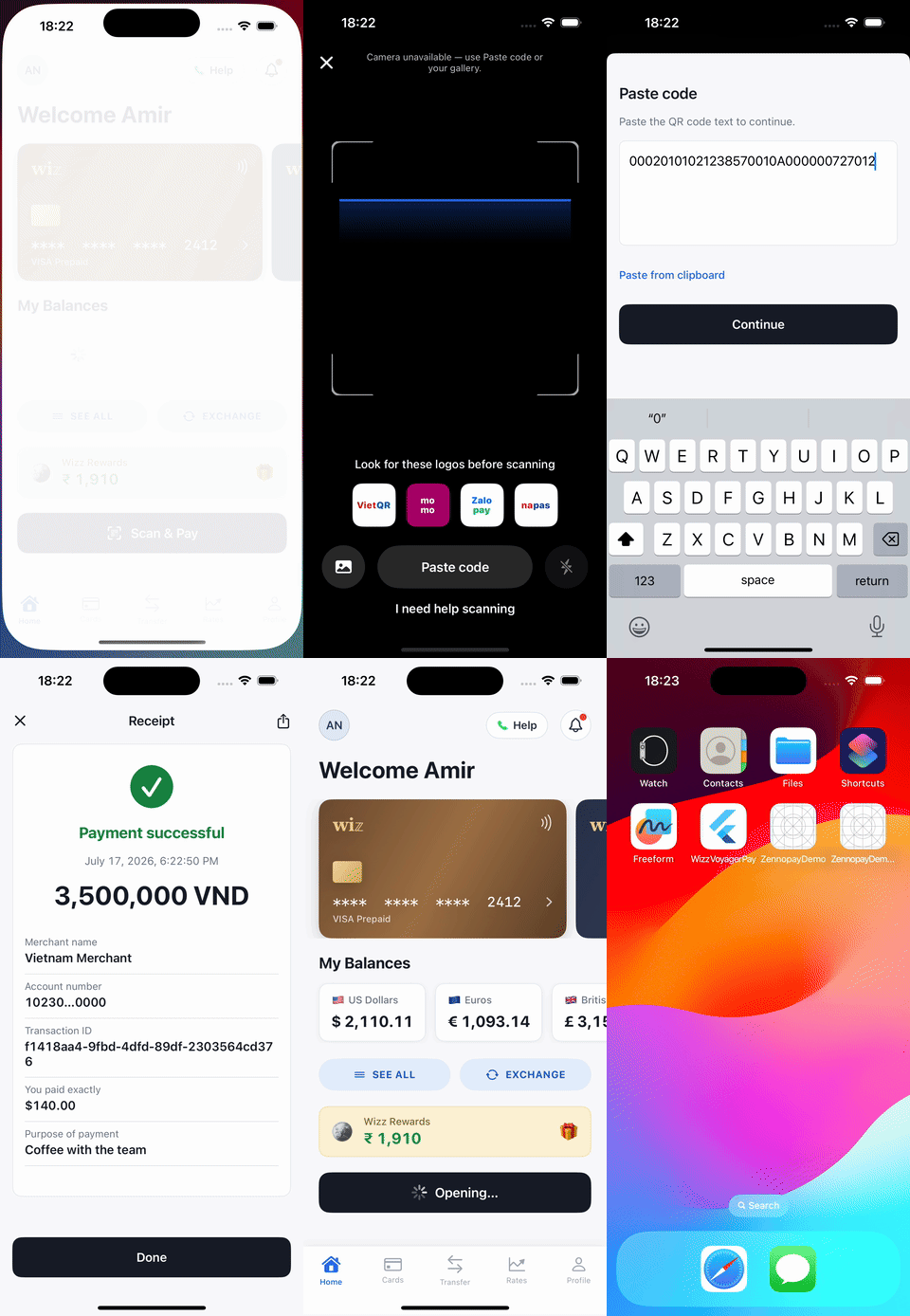
`zennopay_flutter` brings the [PaymentSheet](/payments/overview) to Flutter with
the same shape as Stripe's Flutter SDK: one `await Zennopay.presentSheet(...)`
and the terminal outcome is the resolved value. The sheet renders the full pay
experience — QR scan → amount + FX quote → slide-to-pay → result — and your
app never leaves the foreground.
 ## Requirements
* Flutter 3.19+ / Dart 3.4+
* iOS and Android targets (the sheet uses the device camera via
`mobile_scanner`)
* A backend [session endpoint](/payments/session-endpoint) that creates the
intent and returns the Zennopay-minted session token
## Install
```yaml theme={null}
# pubspec.yaml
dependencies:
zennopay_flutter: ^0.6.0
```
### Platform setup
The scanner uses the camera; add the platform declarations:
**iOS** — `ios/Runner/Info.plist`:
```xml theme={null}
NSCameraUsageDescription
Scan a merchant QR code to pay.
```
**Android** — the plugin's manifest merges in the `CAMERA` permission; nothing
to add. On denial (or no camera), the sheet falls back to a paste-QR field on
both platforms.
## Configure
The environment is a config value, not a code path:
```dart theme={null}
ZennopayConfig.sandbox // https://api.sandbox.zennopay.com — SANDBOX pill (default)
ZennopayConfig.production // https://api.zennopay.com — real money
// Custom gateway (local dev):
ZennopayConfig.custom('http://localhost:3000')
```
**Already shipped on `zennopay.in`?** Nothing to do. Previously published SDK
versions resolve `sandbox` / `production` to the `api.zennopay.in` hosts, and
**those hosts continue to be served** — same API, same credentials. You do not
need to ship an app update to stay working. See
[Environments](/api-reference/environments#legacy-domain-hosts).
Your API keys never live in the app: per payment, your backend
[creates the intent](/payments/session-endpoint) and Zennopay returns a session
token. Your backend passes it to your app, and the SDK holds only that
short-lived token.
## Present the PaymentSheet
With a checkout session from your backend in hand, your app awaits one call:
```dart theme={null}
import 'package:flutter/material.dart';
import 'package:zennopay_flutter/zennopay_flutter.dart';
Future scanAndPay(BuildContext context) async {
// 1. Ask YOUR backend for a checkout session (intent + session token).
final session = await walletApi.createCheckoutSession();
// 2. Present the PaymentSheet and await the terminal result.
final result = await Zennopay.presentSheet(
context: context,
intentId: session.intentId,
sessionToken: session.sessionToken,
refreshSession: (intentId) async {
// Called on session expiry (401): ask your backend to re-mint a token
// for the SAME intent (POST /v1/payment_intents/:id/session),
// or return null if you can't.
final refreshed = await walletApi.refreshSession(intentId);
return refreshed?.sessionToken;
},
config: ZennopayConfig.sandbox, // ZennopayConfig.production for live
);
// 3. One terminal case, exhaustively.
switch (result) {
case Completed(:final receipt):
showReceipt(receipt); // money moved — debit your ledger
case Pending():
showPending(); // may still settle — reconcile via webhook/history
case Canceled():
break; // user backed out; no money moved
case Failed(:final error):
log('payment failed: ${error.code}');
}
}
```
To present without a `BuildContext` (e.g. from a service layer), install the
SDK's navigator key on your `MaterialApp` —
`MaterialApp(navigatorKey: Zennopay.navigatorKey, ...)` — and omit
`context:`.
## Handle the result
Flutter promotes `pending` to a first-class case, and `Completed`/`Pending`
carry an optional `Receipt`:
```dart theme={null}
sealed class PaymentResult { final String intentId; }
final class Completed extends PaymentResult { final Receipt? receipt; }
final class Canceled extends PaymentResult {}
final class Failed extends PaymentResult { final ZennopayError error; }
final class Pending extends PaymentResult { final Receipt? receipt; }
class Receipt {
final String? merchantName;
final int localAmountMinorUnits; // satang for THB; VND has no minor unit
final String localCurrency; // numeric ISO-4217: "704" VND, "764" THB
final int amountUsdCents; // USD debited from the wallet
final String? transactionId;
final String? verifiableQrData; // TH receipt QR; null for VN
final bool pending;
}
```
* `Pending` means status polling timed out before a terminal state — the
payment **may still settle**. Show a soft state and reconcile via your
[webhook](/api-reference/webhooks) or transaction history.
* `Failed` carries a typed `ZennopayError` with a stable
`ZennopayErrorCode` (`invalidJwt`, `intentMismatch`, `jwtExpired`,
`quoteExpired`, `limitExceeded`, `networkError`, …).
## Customize appearance
`ZennopayAppearance` themes the sheet — colors (with per-mode dark variants),
corner radii, typography, primary button, and an optional header logo:
```dart theme={null}
final appearance = ZennopayAppearance(
mode: ThemeMode.system,
colors: const ZennopayColors(
primary: Color(0xFF1B4FD8),
primaryDark: Color(0xFF6E8EF5),
),
shapes: const ZennopayShapes(card: 10, slide: 12),
primaryButton: const ZennopayPrimaryButton(
background: Color(0xFF1B4FD8),
cornerRadius: 10,
),
logo: const AssetImage('assets/wordmark.png'),
);
final result = await Zennopay.presentSheet(
context: context,
intentId: session.intentId,
sessionToken: session.sessionToken,
appearance: appearance,
);
```
Pass nothing (`const ZennopayAppearance.automatic()`) for the default Zennopay
look with system light/dark. Structural rules are not overridable — radii are
clamped to ≤ 12, amounts render in tabular figures, and the accent is reserved
for state.
## Analytics hook
`presentSheet` accepts an optional `onEvent` callback with a small,
privacy-safe event stream (`sheet_presented`, `scan_validated`,
`slide_committed`, `confirm_result`, …) you can forward to your own analytics:
```dart theme={null}
await Zennopay.presentSheet(
// ...
onEvent: (event, props) => analytics.track('zennopay_$event', props),
);
```
## Test
* **Simulator/emulator:** no usable camera — use the sheet's paste-QR fallback
with any VietQR payload string; the backend does the authoritative parse.
* **Sandbox end-to-end:** `ZennopayConfig.sandbox` + a session from your
sandbox backend drives the flow to a real `captured` on the sandbox payout
rail.
* **Fail-fast checks:** a blank or mismatched session token resolves immediately
with `Failed` (`invalidJwt` / `intentMismatch`) before any UI is shown.
The full sandbox checklist — including limit-blocked payments and pending
reconciliation — is in [Test your integration](/payments/testing).
## Next steps
The one backend route the sheet needs.
The sandbox loops to run before release.
Reconcile terminal states server-side.
The corridor limits Zennopay enforces for you.
## Requirements
* Flutter 3.19+ / Dart 3.4+
* iOS and Android targets (the sheet uses the device camera via
`mobile_scanner`)
* A backend [session endpoint](/payments/session-endpoint) that creates the
intent and returns the Zennopay-minted session token
## Install
```yaml theme={null}
# pubspec.yaml
dependencies:
zennopay_flutter: ^0.6.0
```
### Platform setup
The scanner uses the camera; add the platform declarations:
**iOS** — `ios/Runner/Info.plist`:
```xml theme={null}
NSCameraUsageDescription
Scan a merchant QR code to pay.
```
**Android** — the plugin's manifest merges in the `CAMERA` permission; nothing
to add. On denial (or no camera), the sheet falls back to a paste-QR field on
both platforms.
## Configure
The environment is a config value, not a code path:
```dart theme={null}
ZennopayConfig.sandbox // https://api.sandbox.zennopay.com — SANDBOX pill (default)
ZennopayConfig.production // https://api.zennopay.com — real money
// Custom gateway (local dev):
ZennopayConfig.custom('http://localhost:3000')
```
**Already shipped on `zennopay.in`?** Nothing to do. Previously published SDK
versions resolve `sandbox` / `production` to the `api.zennopay.in` hosts, and
**those hosts continue to be served** — same API, same credentials. You do not
need to ship an app update to stay working. See
[Environments](/api-reference/environments#legacy-domain-hosts).
Your API keys never live in the app: per payment, your backend
[creates the intent](/payments/session-endpoint) and Zennopay returns a session
token. Your backend passes it to your app, and the SDK holds only that
short-lived token.
## Present the PaymentSheet
With a checkout session from your backend in hand, your app awaits one call:
```dart theme={null}
import 'package:flutter/material.dart';
import 'package:zennopay_flutter/zennopay_flutter.dart';
Future scanAndPay(BuildContext context) async {
// 1. Ask YOUR backend for a checkout session (intent + session token).
final session = await walletApi.createCheckoutSession();
// 2. Present the PaymentSheet and await the terminal result.
final result = await Zennopay.presentSheet(
context: context,
intentId: session.intentId,
sessionToken: session.sessionToken,
refreshSession: (intentId) async {
// Called on session expiry (401): ask your backend to re-mint a token
// for the SAME intent (POST /v1/payment_intents/:id/session),
// or return null if you can't.
final refreshed = await walletApi.refreshSession(intentId);
return refreshed?.sessionToken;
},
config: ZennopayConfig.sandbox, // ZennopayConfig.production for live
);
// 3. One terminal case, exhaustively.
switch (result) {
case Completed(:final receipt):
showReceipt(receipt); // money moved — debit your ledger
case Pending():
showPending(); // may still settle — reconcile via webhook/history
case Canceled():
break; // user backed out; no money moved
case Failed(:final error):
log('payment failed: ${error.code}');
}
}
```
To present without a `BuildContext` (e.g. from a service layer), install the
SDK's navigator key on your `MaterialApp` —
`MaterialApp(navigatorKey: Zennopay.navigatorKey, ...)` — and omit
`context:`.
## Handle the result
Flutter promotes `pending` to a first-class case, and `Completed`/`Pending`
carry an optional `Receipt`:
```dart theme={null}
sealed class PaymentResult { final String intentId; }
final class Completed extends PaymentResult { final Receipt? receipt; }
final class Canceled extends PaymentResult {}
final class Failed extends PaymentResult { final ZennopayError error; }
final class Pending extends PaymentResult { final Receipt? receipt; }
class Receipt {
final String? merchantName;
final int localAmountMinorUnits; // satang for THB; VND has no minor unit
final String localCurrency; // numeric ISO-4217: "704" VND, "764" THB
final int amountUsdCents; // USD debited from the wallet
final String? transactionId;
final String? verifiableQrData; // TH receipt QR; null for VN
final bool pending;
}
```
* `Pending` means status polling timed out before a terminal state — the
payment **may still settle**. Show a soft state and reconcile via your
[webhook](/api-reference/webhooks) or transaction history.
* `Failed` carries a typed `ZennopayError` with a stable
`ZennopayErrorCode` (`invalidJwt`, `intentMismatch`, `jwtExpired`,
`quoteExpired`, `limitExceeded`, `networkError`, …).
## Customize appearance
`ZennopayAppearance` themes the sheet — colors (with per-mode dark variants),
corner radii, typography, primary button, and an optional header logo:
```dart theme={null}
final appearance = ZennopayAppearance(
mode: ThemeMode.system,
colors: const ZennopayColors(
primary: Color(0xFF1B4FD8),
primaryDark: Color(0xFF6E8EF5),
),
shapes: const ZennopayShapes(card: 10, slide: 12),
primaryButton: const ZennopayPrimaryButton(
background: Color(0xFF1B4FD8),
cornerRadius: 10,
),
logo: const AssetImage('assets/wordmark.png'),
);
final result = await Zennopay.presentSheet(
context: context,
intentId: session.intentId,
sessionToken: session.sessionToken,
appearance: appearance,
);
```
Pass nothing (`const ZennopayAppearance.automatic()`) for the default Zennopay
look with system light/dark. Structural rules are not overridable — radii are
clamped to ≤ 12, amounts render in tabular figures, and the accent is reserved
for state.
## Analytics hook
`presentSheet` accepts an optional `onEvent` callback with a small,
privacy-safe event stream (`sheet_presented`, `scan_validated`,
`slide_committed`, `confirm_result`, …) you can forward to your own analytics:
```dart theme={null}
await Zennopay.presentSheet(
// ...
onEvent: (event, props) => analytics.track('zennopay_$event', props),
);
```
## Test
* **Simulator/emulator:** no usable camera — use the sheet's paste-QR fallback
with any VietQR payload string; the backend does the authoritative parse.
* **Sandbox end-to-end:** `ZennopayConfig.sandbox` + a session from your
sandbox backend drives the flow to a real `captured` on the sandbox payout
rail.
* **Fail-fast checks:** a blank or mismatched session token resolves immediately
with `Failed` (`invalidJwt` / `intentMismatch`) before any UI is shown.
The full sandbox checklist — including limit-blocked payments and pending
reconciliation — is in [Test your integration](/payments/testing).
## Next steps
The one backend route the sheet needs.
The sandbox loops to run before release.
Reconcile terminal states server-side.
The corridor limits Zennopay enforces for you.