> ## Documentation Index
> Fetch the complete documentation index at: https://docs.zennopay.com/llms.txt
> Use this file to discover all available pages before exploring further.
# Android
> Launch the native Zennopay PaymentSheet from your Android app — Kotlin and Compose.
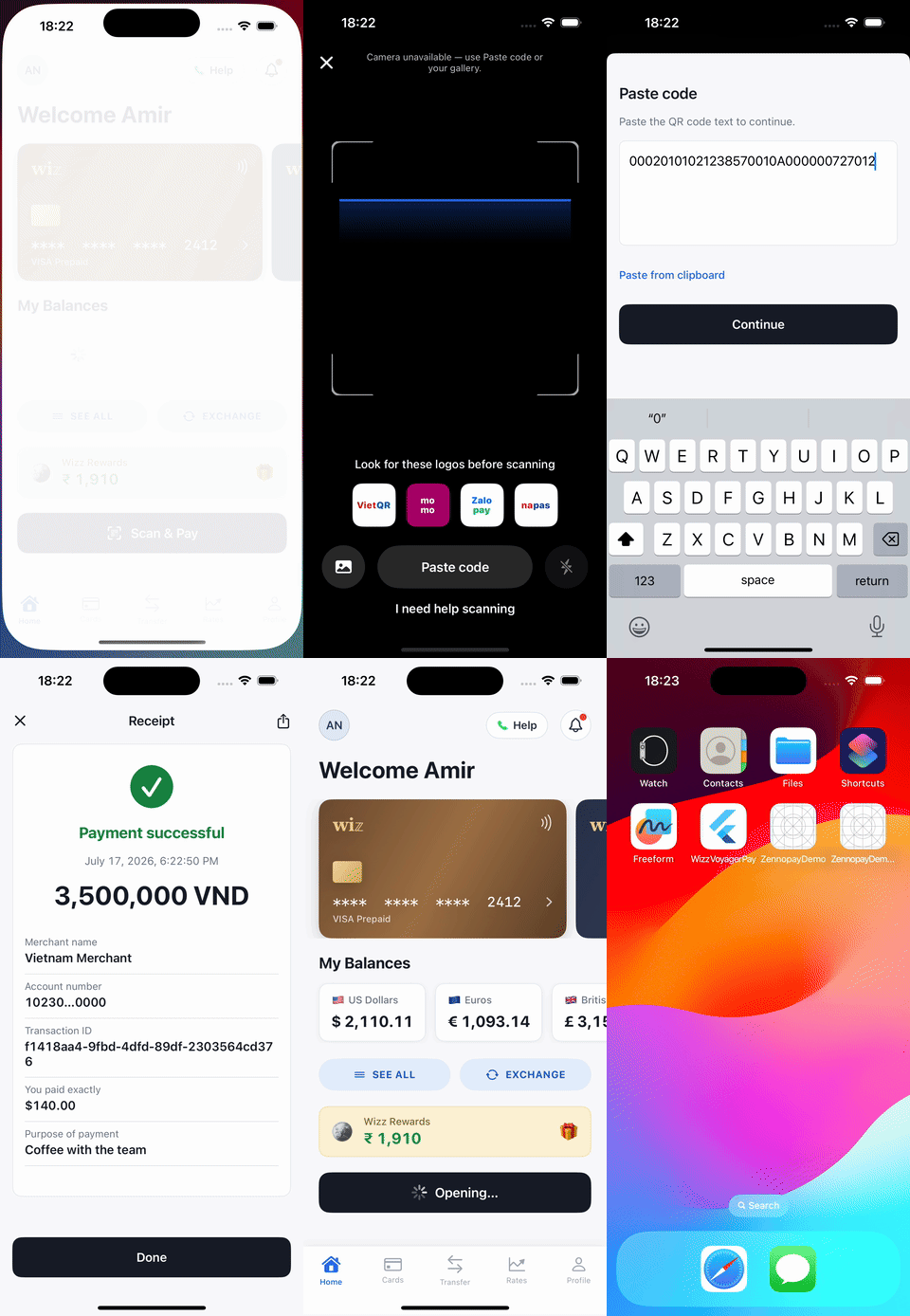
The Zennopay Android SDK launches the [PaymentSheet](/payments/overview) — the full
native pay experience (QR scan → amount + FX quote → slide-to-pay → result) —
as its own full-screen Activity over your app, and delivers exactly one
`PaymentResult` to your callback. The UI is Jetpack Compose; scanning is
CameraX + ML Kit, on-device.
 **Migrating from hosted checkout (beta)?** The Chrome Custom Tab, the
partner-defined deep link, and `Zennopay.openCheckout(...)` are gone. Replace
the call with `Zennopay.presentCheckout(...)` below and **delete** the
`ZennopayCallbackActivity` intent-filter from your manifest — the result now
comes back in-process via the callback, not a deep link. Your app passes the
Zennopay-minted session token to `presentCheckout` (below).
## Requirements
* `minSdk` 24 (Android 7.0), `compileSdk` 34
* Kotlin 1.9+, AndroidX
* Your app does **not** need to use Compose — the sheet runs in its own
Activity. A Compose-first entry point is provided for hosts that are.
* A backend [session endpoint](/payments/session-endpoint) that creates the
intent and returns the Zennopay-minted session token
## Install
```kotlin theme={null}
// app/build.gradle.kts
dependencies {
implementation("in.zennopay:sdk:0.6.0")
}
```
The artifact is published to **Maven Central**, so no extra repository
declaration is needed — `mavenCentral()` in your `settings.gradle.kts` (the
Android default) resolves it. The Gradle coordinate is `in.zennopay:sdk`; the
Kotlin import namespace stays `com.zennopay.sdk`.
### Camera permission
The SDK's manifest already merges in ``
(with the camera marked as an optional feature), and the SDK requests the
runtime permission itself when the scanner opens. You add nothing to your
manifest — just declare camera use in your Play Store listing.
If the user denies the permission, the sheet degrades to a paste-QR-data
fallback — the flow is always completable without a camera.
## Configure
The environment is a value, not a code path:
```kotlin theme={null}
ZennopayConfig.SANDBOX // https://api.sandbox.zennopay.com — SANDBOX pill shown (default)
ZennopayConfig.PRODUCTION // https://api.zennopay.com — real money, no sandbox chrome
// Custom gateway (local dev, pentest):
ZennopayConfig(
apiBaseUrl = "http://10.0.2.2:3000",
environment = ZennopayConfig.Environment.CUSTOM,
)
```
**Already shipped on `zennopay.in`?** Nothing to do. Previously published SDK
versions resolve `SANDBOX` / `PRODUCTION` to the `api.zennopay.in` hosts, and
**those hosts continue to be served** — same API, same credentials. You do not
need to ship an app update to stay working. See
[Environments](/api-reference/environments#legacy-domain-hosts).
You can also set a process-wide default once with
`Zennopay.configure(config)` — per-call `config` still overrides it.
Your API keys never live in the app: per payment, your backend
[creates the intent](/payments/session-endpoint) and Zennopay returns a session
token. Your backend passes it to your app, and the SDK holds only that
short-lived token.
## Present the PaymentSheet
With a checkout session from your backend in hand, your app makes one call.
Two integration patterns:
### Pattern 1 — Compose launcher (recommended)
For Compose hosts, `rememberZennopayLauncher` binds your result callback and
config once and hands you a stable `present` lambda — safe to pass straight to
click handlers, stable across recompositions:
```kotlin theme={null}
import androidx.compose.material3.Button
import androidx.compose.material3.Text
import androidx.compose.runtime.Composable
import com.zennopay.sdk.PaymentResult
import com.zennopay.sdk.ZennopayConfig
import com.zennopay.sdk.rememberZennopayLauncher
@Composable
fun PayButton(session: CheckoutSession, viewModel: WalletViewModel) {
val present = rememberZennopayLauncher(
config = ZennopayConfig.SANDBOX, // .PRODUCTION for live traffic
refreshSession = { intentId ->
// Called on session expiry (401): ask your backend to re-mint a
// token for the SAME intent (POST /v1/payment_intents/:id/session),
// or return null if you can't.
viewModel.remintSessionToken(intentId)
},
) { result ->
when (result) {
is PaymentResult.Completed -> viewModel.onPaid(result)
is PaymentResult.Canceled -> Unit // no money moved
is PaymentResult.Failed -> viewModel.onPaymentFailed(result.error)
}
}
Button(onClick = { present(session.intentId, session.sessionToken) }) {
Text("Scan & Pay")
}
}
```
### Pattern 2 — one-shot `presentCheckout`
From any `ComponentActivity` (Views or Compose), call the entry point directly:
```kotlin theme={null}
import androidx.activity.ComponentActivity
import com.zennopay.sdk.PaymentResult
import com.zennopay.sdk.Zennopay
import com.zennopay.sdk.ZennopayConfig
class WalletActivity : ComponentActivity() {
private fun startPayment(intentId: String, sessionToken: String) {
Zennopay.presentCheckout(
activity = this,
intentId = intentId,
sessionToken = sessionToken,
refreshSession = { id -> walletApi.remintSessionToken(id) },
config = ZennopayConfig.SANDBOX,
) { result ->
when (result) {
is PaymentResult.Completed -> showReceipt(result)
is PaymentResult.Canceled -> Unit // no money moved
is PaymentResult.Failed -> showFailure(result.error)
}
}
}
}
```
The sheet runs in its own Activity, so it owns its lifecycle end to end; your
callback fires exactly once with the terminal result. The session token is
handed to that Activity **in memory** — it is never serialized into the
launching `Intent`, so it can't leak via logcat or recents.
The SDK validates the session token's structure, expiry, and intent binding
synchronously, before launching anything. A token issued for a
different intent fails immediately with
`PaymentResult.Failed(error = IntentMismatch)` — no blank screen, no network
call.
## Handle the result
```kotlin theme={null}
sealed class PaymentResult {
data class Completed(
val intentId: String,
val merchantName: String?, // from the validated scan
val localAmount: String?, // display string, e.g. "120.00"
val localCurrency: String?, // ISO-4217, e.g. "VND"
val usdDebited: String?, // e.g. "3.45"
val transactionId: String?,
val verifiableQrData: String?, // TH receipt QR; null for VN
) : PaymentResult()
data class Failed(val intentId: String?, val error: ZennopayError) : PaymentResult()
data class Canceled(val intentId: String?) : PaymentResult()
}
```
`ZennopayError` is a sealed taxonomy with stable `code` strings
(`InvalidJwt`, `IntentMismatch`, `JwtExpired`, `MalformedToken`,
`InvalidIssuer`, quote/confirm/network cases, …) — exhaustive in a `when`.
On a timeout the payment is effectively *pending* — it may still settle;
reconcile via your [webhook](/api-reference/webhooks) or
`GET /v1/payment_intents/:id` rather than assuming a terminal failure.
## Customize appearance
`ZennopayAppearance` themes the sheet to your brand — colors, corner radii,
typography, primary button, and an optional header logo:
```kotlin theme={null}
import com.zennopay.sdk.ui.ZennopayAppearance
val appearance = ZennopayAppearance(
colors = ZennopayAppearance.Colors(
primary = 0xFF1B4FD8, // your brand accent
),
shapes = ZennopayAppearance.Shapes(card = 10.dp, slide = 12.dp),
primaryButton = ZennopayAppearance.PrimaryButton(
background = 0xFF1B4FD8,
cornerRadius = 10.dp,
),
logo = R.drawable.wordmark,
)
Zennopay.presentCheckout(
activity = this,
intentId = session.intentId,
sessionToken = session.sessionToken,
appearance = appearance,
) { result -> /* … */ }
```
Pass nothing (`ZennopayAppearance.Automatic`) and the sheet uses the default
Zennopay look, following system light/dark.
Structural rules are not overridable: corner radii are clamped to ≤ 12 dp,
amounts always render in tabular figures, and the accent color is reserved
for state signals.
## Test
* **Emulator:** the emulator's virtual camera won't decode a real QR reliably —
use the sheet's **paste-QR** fallback (or the emulator's virtual-scene camera
image) with any VietQR payload string. The backend does the authoritative
parse either way.
* **Sandbox end-to-end:** run `ZennopayConfig.SANDBOX` with a session from your
sandbox backend; the payout runs on the sandbox rail and the intent reaches
`captured`.
* **Fail-fast checks:** pass a blank or mismatched session token and assert an
immediate `Failed(InvalidJwt)` / `Failed(IntentMismatch)` with no UI.
* **Physical device:** camera scanning and the runtime-permission prompt are
the pre-release checklist.
The full sandbox checklist — including limit-blocked payments and pending
reconciliation — is in [Test your integration](/payments/testing).
## Under the hood (what you can rely on)
* The session token is held in memory and sent as `Authorization: Bearer` on
every REST call — never placed in a URL or an `Intent` extra.
* Slide-to-pay fires `POST /confirm` **exactly once**; the idempotency key is
persisted (DataStore) before the network call, so retries and process death
can never double-debit.
* On relaunch mid-payment, the SDK recovers the true terminal status with a
`GET` rather than re-confirming.
## ProGuard / R8
The SDK ships consumer rules; no additional configuration is needed.
## Next steps
The one backend route the sheet needs.
The sandbox loops to run before release.
Reconcile terminal states server-side.
The corridor limits Zennopay enforces for you.
**Migrating from hosted checkout (beta)?** The Chrome Custom Tab, the
partner-defined deep link, and `Zennopay.openCheckout(...)` are gone. Replace
the call with `Zennopay.presentCheckout(...)` below and **delete** the
`ZennopayCallbackActivity` intent-filter from your manifest — the result now
comes back in-process via the callback, not a deep link. Your app passes the
Zennopay-minted session token to `presentCheckout` (below).
## Requirements
* `minSdk` 24 (Android 7.0), `compileSdk` 34
* Kotlin 1.9+, AndroidX
* Your app does **not** need to use Compose — the sheet runs in its own
Activity. A Compose-first entry point is provided for hosts that are.
* A backend [session endpoint](/payments/session-endpoint) that creates the
intent and returns the Zennopay-minted session token
## Install
```kotlin theme={null}
// app/build.gradle.kts
dependencies {
implementation("in.zennopay:sdk:0.6.0")
}
```
The artifact is published to **Maven Central**, so no extra repository
declaration is needed — `mavenCentral()` in your `settings.gradle.kts` (the
Android default) resolves it. The Gradle coordinate is `in.zennopay:sdk`; the
Kotlin import namespace stays `com.zennopay.sdk`.
### Camera permission
The SDK's manifest already merges in ``
(with the camera marked as an optional feature), and the SDK requests the
runtime permission itself when the scanner opens. You add nothing to your
manifest — just declare camera use in your Play Store listing.
If the user denies the permission, the sheet degrades to a paste-QR-data
fallback — the flow is always completable without a camera.
## Configure
The environment is a value, not a code path:
```kotlin theme={null}
ZennopayConfig.SANDBOX // https://api.sandbox.zennopay.com — SANDBOX pill shown (default)
ZennopayConfig.PRODUCTION // https://api.zennopay.com — real money, no sandbox chrome
// Custom gateway (local dev, pentest):
ZennopayConfig(
apiBaseUrl = "http://10.0.2.2:3000",
environment = ZennopayConfig.Environment.CUSTOM,
)
```
**Already shipped on `zennopay.in`?** Nothing to do. Previously published SDK
versions resolve `SANDBOX` / `PRODUCTION` to the `api.zennopay.in` hosts, and
**those hosts continue to be served** — same API, same credentials. You do not
need to ship an app update to stay working. See
[Environments](/api-reference/environments#legacy-domain-hosts).
You can also set a process-wide default once with
`Zennopay.configure(config)` — per-call `config` still overrides it.
Your API keys never live in the app: per payment, your backend
[creates the intent](/payments/session-endpoint) and Zennopay returns a session
token. Your backend passes it to your app, and the SDK holds only that
short-lived token.
## Present the PaymentSheet
With a checkout session from your backend in hand, your app makes one call.
Two integration patterns:
### Pattern 1 — Compose launcher (recommended)
For Compose hosts, `rememberZennopayLauncher` binds your result callback and
config once and hands you a stable `present` lambda — safe to pass straight to
click handlers, stable across recompositions:
```kotlin theme={null}
import androidx.compose.material3.Button
import androidx.compose.material3.Text
import androidx.compose.runtime.Composable
import com.zennopay.sdk.PaymentResult
import com.zennopay.sdk.ZennopayConfig
import com.zennopay.sdk.rememberZennopayLauncher
@Composable
fun PayButton(session: CheckoutSession, viewModel: WalletViewModel) {
val present = rememberZennopayLauncher(
config = ZennopayConfig.SANDBOX, // .PRODUCTION for live traffic
refreshSession = { intentId ->
// Called on session expiry (401): ask your backend to re-mint a
// token for the SAME intent (POST /v1/payment_intents/:id/session),
// or return null if you can't.
viewModel.remintSessionToken(intentId)
},
) { result ->
when (result) {
is PaymentResult.Completed -> viewModel.onPaid(result)
is PaymentResult.Canceled -> Unit // no money moved
is PaymentResult.Failed -> viewModel.onPaymentFailed(result.error)
}
}
Button(onClick = { present(session.intentId, session.sessionToken) }) {
Text("Scan & Pay")
}
}
```
### Pattern 2 — one-shot `presentCheckout`
From any `ComponentActivity` (Views or Compose), call the entry point directly:
```kotlin theme={null}
import androidx.activity.ComponentActivity
import com.zennopay.sdk.PaymentResult
import com.zennopay.sdk.Zennopay
import com.zennopay.sdk.ZennopayConfig
class WalletActivity : ComponentActivity() {
private fun startPayment(intentId: String, sessionToken: String) {
Zennopay.presentCheckout(
activity = this,
intentId = intentId,
sessionToken = sessionToken,
refreshSession = { id -> walletApi.remintSessionToken(id) },
config = ZennopayConfig.SANDBOX,
) { result ->
when (result) {
is PaymentResult.Completed -> showReceipt(result)
is PaymentResult.Canceled -> Unit // no money moved
is PaymentResult.Failed -> showFailure(result.error)
}
}
}
}
```
The sheet runs in its own Activity, so it owns its lifecycle end to end; your
callback fires exactly once with the terminal result. The session token is
handed to that Activity **in memory** — it is never serialized into the
launching `Intent`, so it can't leak via logcat or recents.
The SDK validates the session token's structure, expiry, and intent binding
synchronously, before launching anything. A token issued for a
different intent fails immediately with
`PaymentResult.Failed(error = IntentMismatch)` — no blank screen, no network
call.
## Handle the result
```kotlin theme={null}
sealed class PaymentResult {
data class Completed(
val intentId: String,
val merchantName: String?, // from the validated scan
val localAmount: String?, // display string, e.g. "120.00"
val localCurrency: String?, // ISO-4217, e.g. "VND"
val usdDebited: String?, // e.g. "3.45"
val transactionId: String?,
val verifiableQrData: String?, // TH receipt QR; null for VN
) : PaymentResult()
data class Failed(val intentId: String?, val error: ZennopayError) : PaymentResult()
data class Canceled(val intentId: String?) : PaymentResult()
}
```
`ZennopayError` is a sealed taxonomy with stable `code` strings
(`InvalidJwt`, `IntentMismatch`, `JwtExpired`, `MalformedToken`,
`InvalidIssuer`, quote/confirm/network cases, …) — exhaustive in a `when`.
On a timeout the payment is effectively *pending* — it may still settle;
reconcile via your [webhook](/api-reference/webhooks) or
`GET /v1/payment_intents/:id` rather than assuming a terminal failure.
## Customize appearance
`ZennopayAppearance` themes the sheet to your brand — colors, corner radii,
typography, primary button, and an optional header logo:
```kotlin theme={null}
import com.zennopay.sdk.ui.ZennopayAppearance
val appearance = ZennopayAppearance(
colors = ZennopayAppearance.Colors(
primary = 0xFF1B4FD8, // your brand accent
),
shapes = ZennopayAppearance.Shapes(card = 10.dp, slide = 12.dp),
primaryButton = ZennopayAppearance.PrimaryButton(
background = 0xFF1B4FD8,
cornerRadius = 10.dp,
),
logo = R.drawable.wordmark,
)
Zennopay.presentCheckout(
activity = this,
intentId = session.intentId,
sessionToken = session.sessionToken,
appearance = appearance,
) { result -> /* … */ }
```
Pass nothing (`ZennopayAppearance.Automatic`) and the sheet uses the default
Zennopay look, following system light/dark.
Structural rules are not overridable: corner radii are clamped to ≤ 12 dp,
amounts always render in tabular figures, and the accent color is reserved
for state signals.
## Test
* **Emulator:** the emulator's virtual camera won't decode a real QR reliably —
use the sheet's **paste-QR** fallback (or the emulator's virtual-scene camera
image) with any VietQR payload string. The backend does the authoritative
parse either way.
* **Sandbox end-to-end:** run `ZennopayConfig.SANDBOX` with a session from your
sandbox backend; the payout runs on the sandbox rail and the intent reaches
`captured`.
* **Fail-fast checks:** pass a blank or mismatched session token and assert an
immediate `Failed(InvalidJwt)` / `Failed(IntentMismatch)` with no UI.
* **Physical device:** camera scanning and the runtime-permission prompt are
the pre-release checklist.
The full sandbox checklist — including limit-blocked payments and pending
reconciliation — is in [Test your integration](/payments/testing).
## Under the hood (what you can rely on)
* The session token is held in memory and sent as `Authorization: Bearer` on
every REST call — never placed in a URL or an `Intent` extra.
* Slide-to-pay fires `POST /confirm` **exactly once**; the idempotency key is
persisted (DataStore) before the network call, so retries and process death
can never double-debit.
* On relaunch mid-payment, the SDK recovers the true terminal status with a
`GET` rather than re-confirming.
## ProGuard / R8
The SDK ships consumer rules; no additional configuration is needed.
## Next steps
The one backend route the sheet needs.
The sandbox loops to run before release.
Reconcile terminal states server-side.
The corridor limits Zennopay enforces for you.